Table of content
How to use this manual
WELCOME - Manual openLCA 2
1.
Introduction
❱
1.1.
Why openLCA was started
1.2.
openLCA now
1.3.
What you can do with openLCA
1.4.
GreenDelta GmbH - about the developer
1.5.
openLCA 2 - new features
2.
How to get openLCA running
❱
2.1.
Hardware requirements
2.2.
Download and installation
2.3.
Adjust memory
2.4.
Download fast libraries
2.5.
Update openLCA to the lastest version
3.
Resources
❱
3.1.
openLCA.org
3.2.
openLCA Nexus
3.3.
ask.openlCA
Welcome to openLCA!
4.
openLCA key features with an LCA case study
The basics for openLCA
5.
Running openLCA for the first time
❱
5.1.
Toolbar: File
5.2.
Toolbar: Database
5.3.
Toolbar: Tools
5.4.
Toolbar: Help
5.5.
openLCA search function
5.6.
Using the editor function
5.7.
Working with tabs
6.
Databases
❱
6.1.
Database elements
6.2.
Creating a new database loading it from file
6.3.
Creating a new database from scratch
6.4.
Database update
6.5.
Importing data and combining databases
6.6.
Using mapping files and validating databases
6.7.
Exporting databases
7.
Flows
❱
7.1.
Creating a new flow
7.2.
Flow tabs
8.
Processes
❱
8.1.
Creating a new process
8.2.
Process tabs
❱
8.2.1.
General information
8.2.2.
Inputs/Outputs
8.2.3.
Documentation
8.2.4.
Parameters
8.2.5.
Allocation
8.2.6.
Social aspects
8.2.7.
Direct impacts
9.
Product Systems
❱
9.1.
Creating a new product system
9.2.
Product system tabs
9.3.
Model graph
9.4.
Advanced product systems features
9.5.
Calculating a product system
9.6.
Exporting/saving product systems
10.
LCIA methods and categories
❱
10.1.
Importing LCIA methods and categories into openLCA
10.2.
Creating a new impact assessment method, category and characterization factor
10.3.
Methods tabs
10.4.
Category tabs
❱
10.4.1.
General information (including impact direction)
10.4.2.
Characterization factors
10.4.3.
Parameters
10.4.4.
Regionalized calculation
10.4.5.
Similarities
10.5.
Overview impact methods
11.
Calculation and Result Analysis
❱
11.1.
Lazy vs Eager calculation
11.2.
Result analysis
❱
11.2.1.
General information
11.2.2.
Inventory result
11.2.3.
Impact analysis
11.2.4.
Process results
11.2.5.
Contribution tree
11.2.6.
Grouping
11.2.7.
Locations
11.2.8.
Sankey diagram
11.2.9.
Analysis groups
11.2.10.
LCIA checks
11.3.
Save and export results
12.
Projects
❱
12.1.
Creating a new Project
12.2.
Report template
12.3.
Project results
12.4.
Project report
13.
Waste modelling
14.
Allocation
15.
Parameters
❱
15.1.
Parameter types
15.2.
Parameter hierarchy
15.3.
Parameter sets
15.4.
Parameter analysis
15.5.
Advanced: Dependent parameters
16.
Background data
Guidance for LCA practitioners
17.
Model validation in openLCA
18.
Data aggregation in openLCA
The advanced knowledge base
19.
Advanced Topics
❱
19.1.
Regionalized LCA
19.2.
Life Cycle Costing
19.3.
Social aspects
19.4.
Data Quality
19.5.
Monte Carlo simulation
19.6.
API clients in openLCA
19.7.
Modelling with time parameter
19.8.
System dynamics
20.
Environmental Product Declarations (EPDs)
❱
20.1.
Creating new processes for target products
20.2.
Create product systems from your processes
20.3.
Calculate the impact assessment
20.4.
Save your results
20.5.
Creating EPDs in openLCA
20.6.
Importing EPD results from various sources
❱
20.6.1.
Adding EPDs manually
20.6.2.
Using soda4LCA
20.6.3.
Import EPDs from openEPD
20.6.4.
Using ILCD import
20.7.
Using results of EPDs in life cycle models
20.8.
Uploading EPDs on SmartEPD
21.
Libraries
❱
21.1.
Adding a library to a database
21.2.
Exporting a database as a library
21.3.
Library file system
22.
Scripting in openLCA
23.
Updating background of databases
24.
Collaboration in Teams
25.
openLCA cheat sheet
❱
25.1.
Usage
25.2.
Direct impact calculations in processes
25.3.
openLCA and Excel
25.4.
Tags
25.5.
Constants, operators and functions for formulas in openLCA
25.6.
Shortcuts in openLCA
25.7.
Searching for CAS numbers in openLCA
Updates
26.
Latest manual updates
27.
Latest software updates
Contact
Light
Rust
Coal
Navy
Ayu
openLCA manual
Allocation
Allocation tab
Check out the "
Allocation
" section.
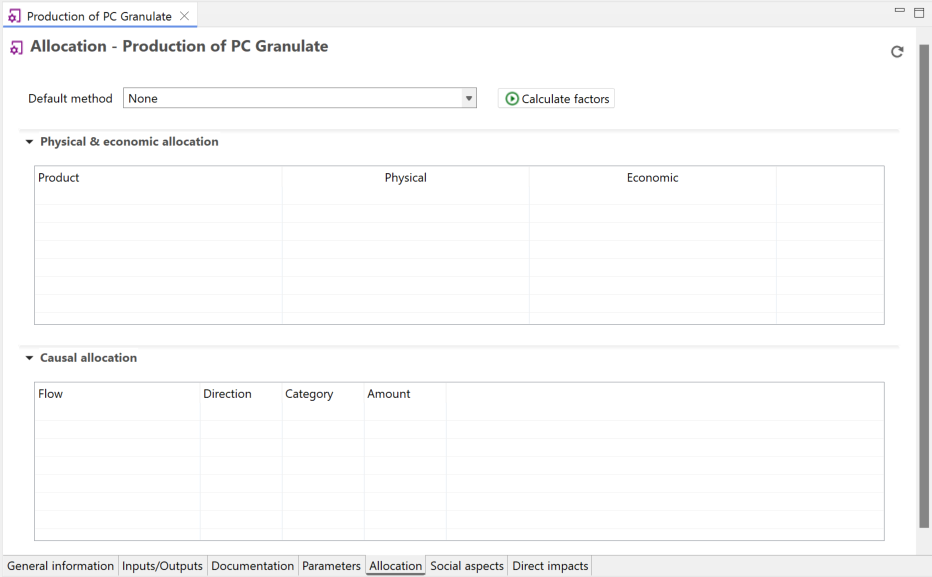 Allocation tab