Introduction
This is a guide to automating openLCA: doing in seconds, with a few lines of instructions, what would otherwise be an afternoon of clicking — bulk edits, calculations across many systems, custom exports. It does assume some basic programming knowledge — the examples are written in Python, so a little prior experience with Python (or any language) will make them much easier to follow.
To start right away, go to the Quickstart.
What you can do with it
Common uses include:
- Calculate many product systems at once and write the results to a single spreadsheet, rather than running and exporting them individually. (Batch calculate to Excel)
- Test sensitivity by running a system repeatedly with different parameter values. (Sensitivity analysis)
- Edit data in bulk — rename, recategorize, or correct the same field across hundreds of processes in a single pass. (Update a process)
- Build models from a spreadsheet, creating flows, processes, and product systems from existing data. (Create a flow, a process, a product system)
- Produce custom reports in the layout you need. (Excel automation)
Is this the right tool for me?
You write your scripts in an editor built into openLCA, so there is nothing to install. openLCA includes Python (called Jython) and runs your scripts directly.
If you are an experienced Python developer, you may prefer openLCA's IPC API, which lets you control openLCA from your own Python installation.
Before you start
Scripts write directly to your database, creating, editing, and deleting datasets, and those changes are not easily undone. Work on a copy of your database until you are confident that a script behaves as intended.
The Quickstart covers writing and running your first script.
Quickstart
This page covers writing and running your first script.
Open the script editor
In openLCA, go to Tools → Developer Tools → Python. This opens the editor used to write and run
scripts.


Run your first script
Enter the following in the editor and click Run (the ▶ button in the toolbar):
print("Hello world!")
The openLCA console displays:
Hello world!

This is the basic cycle: write a script, run it, and read the output in the console.
Read from your database
This script reads from your database, so openLCA must be open with a database loaded. If you do not have one yet, see Set up a database first.
# Remember to run this with a database open
flows = db.getAll(Flow)
print("Your database contains %d flows." % len(flows))
Two details are worth noting. db refers to the open database and is always available; you do not need
to set it up. And Flow is used without an import: openLCA makes its data model available
automatically. Both are explained in Technical details.
Where to go next
- Set up a database — if you do not have one ready
- A minimal example — a complete model and calculation from start to finish
- A specific task: flows, processes, product systems, calculation, or Excel
Set up a database
Most scripts read from or write to a database, so you need one open before they do anything useful. If you are only trying things out, an empty database with reference data and the standard LCIA methods is a good starting point.
Create a database with reference data
In the menu, go to Database → New database → From scratch..., enter a name, and select Complete
reference data before clicking Finish.
This creates a database containing the reference data — units, flow properties, and so on. For more detail, see Creating a new database from scratch.
Import the LCIA methods
Download the openLCA LCIA methods package from Nexus and import it into the database you just created. For more detail, see Importing LCIA methods into openLCA.
A ready-made alternative
The database above starts empty of content: it has reference data and methods, but no processes or product systems — you create those yourself. If you would rather begin with real data to explore and calculate, the free BAFU database on Nexus is one option; a few of the examples use it.
You are ready
Open the database. The db variable in your scripts now refers to it. Continue with
A minimal example.
A minimal example
This chapter provides a straightforward example of using the openLCA Jython interface to access datasets and perform a calculation.
The objective is to create a basic model for boiling water and evaluate its environmental impact using the EPD 2018 impact method. This example serves as a starting point for working with openLCA programmatically, demonstrating how to retrieve data and run calculations efficiently.
This example assumes a database with reference data and the LCIA methods, open in openLCA. If you do not have one yet, see Set up a database.
Now that you have created a database and opened it, you will be able to interact with its datasets
via the Python script. The routine is quite simple: create datasets and add them to the database
(db.insert) or retrieve them from the database (db.getForName or db.get).
## Create the product system

# First, let's create a flow representing Boiling water, using a Volume as
# dimension. The `FlowProperty` tells the system how to measure the quantity
# of this flow – i.e. in any unit of volume (liters or cubic meters, ... ).

# retrieve the flow property from the database
volume = db.getForName(FlowProperty, "Volume")
assert isinstance(volume, FlowProperty), "Volume flow property not found"
# create the flow with its name and flow property
boiling_water = Flow.product("Boiling water", volume)

# create a process for boiling water (name and reference flow)
boiling_water_kettle = Process.of(
    "Boiling water with an electric kettle", boiling_water
)

# retrieve the water flow from the database
water = db.getForName(Flow, "Water")
assert isinstance(water, Flow), "Water flow not found"
# add the water flow to the process as an input
boiling_water_kettle.input(water, 0.001)  # m3

# create a flow for the electricity needed for the kettle
# retrieve the energy flow property from the database
energy = db.getForName(FlowProperty, "Energy")
assert isinstance(energy, FlowProperty), "Energy flow property not found"
# create the flow for the electricity
electricity = Flow.product("Electricity", energy)
# add the electricity flow to the process
boiling_water_kettle.input(electricity, 0.35)  # MJ

# create a process for the electricity production
electricity_production = Process.of("Electricity production", electricity)
# get the flow for coal
coal = db.getForName(Flow, "Coal, hard, unspecified")
assert isinstance(coal, Flow), "Coal flow not found"
# add the coal flow to the process
electricity_production.input(coal, 0.05)  # kg

# insert the flows and processes into the database
db.insert(boiling_water, electricity, boiling_water_kettle, electricity_production)

# It is important to insert the processes and the flows before running the
# `ProductSystem.link` method. If you run the `ProductSystem.link` method before
# inserting the processes and the flows, openLCA won't be able to correctly
# link the processes.

# create a product system
system = ProductSystem.of("Boiling water with an electric kettle", boiling_water_kettle)
# link the processes to the exchanges
system.link(electricity_production, boiling_water_kettle)

# the product system only exists in memory, so we need to insert the product
# system in the database
db.insert(system)

# refresh the navigator to see the new processes, flows and product system
App.runInUI("Refresh navigator", lambda: Navigator.refresh())


## Run a calculation

# To run a calculation, we need to create a calculation setup with the product
# system that we have created as well as the _EPD 2018_ impact method. The
# calculation is then run with the `SystemCalculator` class.

# retrieve the EPD 2018 impact method
method = db.getForName(ImpactMethod, "EPD 2018")
# create the calculation setup
setup = CalculationSetup.of(system).withImpactMethod(method)
# run the calculation
result = SystemCalculator(db).calculate(setup)

# Now that the calculation has run, we can access the results. For example, we
# can get the total impact value of the _Abiotic depletion, fossil fuels_
# impact category (as an example).

# retrieve the Abiotic depletion, fossil fuels impact category
categories = list(method.impactCategories)
# searching in the list of impact categories
impact = next(i for i in categories if i.name == "Abiotic depletion, fossil fuels")
# get the total impact value for the impact
value = result.getTotalImpactValueOf(Descriptor.of(impact))

print(
    "The total impact on %s for %s is %.3f %s."
    % (impact.name, system.name, value, impact.referenceUnit)
)

# Output:
#   The total impact on Abiotic depletion, fossil fuels for Boiling water with
#   an electric kettle is 0.318 MJ.
Technical details
Scripts run in the editor at Tools → Developer Tools → Python, using Jython (Python 2.7). The editor
prepares the environment so that the openLCA data model and the current database are available without
any setup on your part.
You don't need to import openLCA classes
openLCA's data model and tools are made available automatically, so you can use them directly, without
any import. That is why the examples in this manual have no import lines for them.
The ones you will meet first are Flow, Process, ProductSystem and ImpactMethod for the data, and
CalculationSetup and SystemCalculator for running a calculation.
Many more are available. For the complete list — and how to look up what each class can do — see Available classes and imports.
The db variable is your database
The open database is always available as the variable db. Use it to read and write datasets:
db.get(Flow, uuid)— get one dataset by its UUIDdb.getForName(Flow, "Water")— get one dataset by namedb.getAll(Flow)— get every dataset of a typedb.insert(entity),db.update(entity),db.delete(entity)— save your changes
db is None when no database is open, so open one first — see
Set up a database.
Two more variables are always available: log, for writing messages to the log, and direct, a helper
for the occasional lazy collection field.
Standard Python, and its limits
Jython is an implementation of Python 2.7 and supports most of its standard library, so ordinary Python
works as expected — reading and writing files, string formatting, the csv module, and so on.
One thing to watch: this is Python 2.7, not Python 3, so a few conveniences you may expect are
missing or behave differently — there are no f-strings (use "total: %s" % value or
"total: {}".format(value)), dividing two integers truncates (1 / 2 is 0, not 0.5), and text and
encoding are handled differently. The Python 2.7 documentation is the
reference for these.
The other limitation is that libraries relying on C extensions, such as NumPy and Pandas, are not available. If your work depends on those, you can control openLCA from your own Python installation using the IPC API.
Flow
Flows represent products and materials that move throughout a life cycle, interconnected within the process network, and take form of inputs, outputs, energy, or emissions. Flows can be substances, products, materials, energy carriers, emissions, or other types of inputs or outputs. A flow is characterized by its name, flow type, and reference flow property (unit category in which the flow is expressed). Examples of flows include electricity, water, CO2 emissions, aluminium, and so on.
In general, openLCA distinguishes three flow types:
- Elementary flows: These flows represent material or energy entering the system that has been drawn from the environment without previous human transformation, or material or energy leaving the system and released into the environment without further human transformation. For example, crude oil extracted from the ground, or emissions released into the air.
- Product flows: These are all the flows that are not elementary or waste flows, and represent the materials or energy exchanged between processes within the product system.
- Waste flows: Waste flows are any substances or objects that the holder needs to dispose of, like by-products with no market value or those requiring more resources to recycle than their economic return.
Each flow created in openLCA must be associated with a reference flow property, such as mass, volume, area, and so on. Though, it is also possible to have multiple flow properties for the same flow (e.g. uranium can be measured using both mass and radioactivity units, gasses can be measured using both mass and volume units, etc.)
Note: Certain waste flows can also be modelled as product flows. In databases this is usually stated in the name. Waste paper is a great example. As it can be used in the production of paper, waste paper isn't necessarily modelled as a waste flow but instead as a product flow.
Source: openLCA 2 manual — Flows
In scripts, flows are the things that are moved around as inputs and outputs (exchanges) of processes. When a process produces electricity and another process consumes electricity from the first process, both processes will have an output exchange and an input exchange with a reference to the same flow.
A Flow has a type and a reference FlowProperty; the flow property points to a UnitGroup, which
holds its units (one reference unit plus conversions).
Create a flow from scratch
The following example creates three flows: a product, a waste and an elementary flow.
Each flow created in openLCA must be associated with a reference flow property, such as mass, volume,
area, and so on — this is the second argument passed to Flow.product, Flow.waste and
Flow.elementary below.
# get the mass and volume flow properties from the database
mass = db.getForName(FlowProperty, "Mass")
volume = db.getForName(FlowProperty, "Volume")

# create a product flow
aluminium_ingot = Flow.product("Aluminium ingot", mass)

# create a waste flow
waste_water = Flow.waste("Industrial waste water", volume)

# create an elementary flow
water = Flow.elementary("Water", volume)

# insert the flows into the database
db.insert(aluminium_ingot, waste_water, water)

# refresh the navigator to see the new flows
App.runInUI("Refresh navigator", lambda: Navigator.refresh())
Get flows from the database
You can retrieve a flow by its name or UUID, fetch its lightweight descriptor, or load every flow in the database at once.
# get and print the flow by name
flow_by_name = db.getForName(Flow, "Aluminium ingot")
print(flow_by_name)

# get and print the flow by id (copy the UUID from the openLCA flow page)
flow_by_id = db.get(Flow, "UUID_of_the_flow")
print(flow_by_id)

# get and print the descriptor of a flow (smaller object)
flow = db.getDescriptor(Flow, "UUID_of_the_flow")
print(flow)

# get and print all the database flows (can take a while)
flows = db.getAll(Flow)
for flow in flows:
    print(flow)

# get and print all the database flow descriptors (can take a while)
flow_descriptors = db.getDescriptors(Flow)
for flow_descriptor in flow_descriptors:
    print(flow_descriptor)
Update a flow (edit, add information, etc.)
To change a flow, fetch it from the database, edit its fields, bump its version and write it back with
db.update.
# let's say, we have created and inserted a flow
mass = db.getForName(FlowProperty, "Mass")
aluminium_ingot = Flow.product("Aluminium ingot", mass)
# get the flow UUID to retrieve it from the database
uuid = aluminium_ingot.refId
db.insert(aluminium_ingot)

# get the flow from the database (the UUID can be copied from the flow page)
flow = db.get(Flow, uuid)

# update the flow name
flow.name = "Aluminium bar"

# update some more properties
aluminium_ingot.description = ("A piece of relatively pure material, that is "
    + "cast into a shape suitable for further processing.")
aluminium_ingot.casNumber = "1234-56-78"
aluminium_ingot.formula = "12 * 34 / 56"
aluminium_ingot.synonyms = "aluminium, aluminium ingot"
france = db.getForName(Location, "France")
aluminium_ingot.location = france

# increase the version and update the last update date
Version.incUpdate(flow)  # or incMinor/incMajor to increase minor/major version
# update the flow in the database
db.update(flow)

# refresh the navigator to see the new flow
App.runInUI("Refresh navigator", lambda: Navigator.refresh())
Move a flow to a category
Assign a flow to a category by setting its category field to a category you create (or reuse) with
CategoryDao.sync.
# create only categories that do not exist, the path is provided
flow_category = CategoryDao.sync(db, ModelType.FLOW, "Material", "Metal")

# creates a product flow and add its category
mass = db.getForName(FlowProperty, "Mass")
product = Flow.product("Gold", mass)
product.category = flow_category

db.insert(product)

# refresh the navigator
App.runInUI("Refresh navigator", lambda: Navigator.refresh())
Delete a flow
Remove a flow from the database by fetching it and passing it to db.delete.
# let's assume we want to delete the following flow from the database
mass = db.getForName(FlowProperty, "Mass")
f = Flow.product("Flow", mass)
uuid = f.refId
db.insert(f)

# get the flow from the database
flow = db.get(Flow, uuid)

# delete the flow from the database
db.delete(flow)

# refresh the navigator
App.runInUI("Refresh navigator", lambda: Navigator.refresh())
Process
A process is a set of interrelated activities that takes place within the life cycle of a product or system, and transforms inputs into outputs. A process can be a manufacturing process, a transportation activity, an energy generation process, or any other operation within the life cycle. Processes are defined by their quantitative reference, which represents the amount of product or service that the process provides. For example, a process could be the set of all inputs and outputs occurring in the production of 1 kg of PET granulate.
openLCA distinguishes two types of processes:
- Unit process: A unit process is the smallest (least aggregated) unit in a production system, for which input and output data are quantified. It can contain any flow type.
- System process: A system process is an aggregated life cycle result saved as a process.
Source: openLCA 2 manual — Processes
In scripts, a process describes the inputs and outputs (exchanges) related to a quantitative reference which is typically the output product of the process.
A ProductSystem is built from a reference Process and links to others; each Process holds
input/output Exchanges that reference Flows.
- Create from scratch
- Create from existing flow
- Get from the database
- Update with more info
- Parametrize input exchanges
- Add a default provider
- Update exchange amount
- Move to a category
- Delete a process
Create a process
The following example creates a process for the production of aluminium.
A process is defined by its quantitative reference, which represents the amount of product or
service that the process provides. In the script below, the output flow aluminium passed to
Process.of becomes the quantitative reference (with a default amount of 1 kg), and the other inputs
and outputs are expressed relative to it.
Source: openLCA 2 manual — Processes
Inputs:
- 1.9 kg of alumina
- 0.4 kg of carbon anode
- 50.0 MJ of electricity
Outputs:
- 1.0 kg of aluminium
- 0.02 m³ of wastewater
# get flow properties from the database
mass = db.getForName(FlowProperty, "Mass")
energy = db.getForName(FlowProperty, "Energy")
volume = db.getForName(FlowProperty, "Volume")

# create the product output flow (quantitative reference)
aluminium = Flow.product("Aluminium ingot", mass)

# create the aluminium production process with 1 kg of aluminium as
# quantitative reference
process = Process.of("Aluminium production", aluminium)

# add the material input flows
alumina = Flow.product("Alumina", mass)
process.input(alumina, 1.9)  # kg alumina per kg aluminium
carbon_anode = Flow.product("Carbon anode", mass)
process.input(carbon_anode, 0.4)  # kg anode consumption

# add the electricity input flow
electricity = Flow.product("Electricity, medium voltage", energy)
process.input(electricity, 50.0)  # MJ

# add waste water output flow
wastewater = Flow.waste("Industrial wastewater", volume)
process.output(wastewater, 0.02)  # m3

# insert all new objects into the database
db.insert(
    alumina,
    carbon_anode,
    electricity,
    wastewater,
    aluminium,
    process,
)

# refresh the navigator to display the new process
App.runInUI("Refresh navigator", lambda: Navigator.refresh())
Create a new process with already existing flow and provider
This example creates a new process for the production of tea, using the elementary flow "Water", already existing in the database.
# let's assume the "Water" elementary flow already exists
volume = db.getForName(FlowProperty, "Volume")
flow = Flow.elementary("Water", volume)
# get the flow UUID to retrieve from the database
uuid = flow.refId
db.insert(flow)

# get the flow from the database
water = db.get(Flow, uuid)

# create a quantitative reference
mass = db.getForName(FlowProperty, "Mass")
output = Flow.product("Tea", mass)

# create the process
process = Process.of("Tea production", output)

# add the elementary flow as input
process.input(water, 1.0)

# insert the process into the database
db.insert(output, process)

# refresh the navigator
App.runInUI("Refresh navigator", lambda: Navigator.refresh())
Get processes from the database
You can retrieve a process by its name or UUID, fetch its lightweight descriptor, or load every process in the database at once.
# get and print the process by name
process_by_name = db.getForName(Process, "Aluminium ingot")
print(process_by_name)

# get and print the process by id (copy the UUID from the openLCA process page)
process_by_id = db.get(Process, "UUID_of_the_process")
print(process_by_id)

# get and print the descriptor of a process (smaller object)
process = db.getDescriptor(Process, "UUID_of_the_process")
print(process)

# get and print all the database processes (can take a while)
processes = db.getAll(Process)
for process in processes:
    print(process)

# get and print all the database process descriptors (can take a while)
process_descriptors = db.getDescriptors(Process)
for process_descriptor in process_descriptors:
    print(process_descriptor)
Update a process (edit, add information, etc.)
To change a process, fetch it from the database, edit its fields, bump its version and write it back
with db.update.
# let's say, we have created an inserted a process
mass = db.getForName(FlowProperty, "Mass")
aluminium_ingot = Flow.product("Aluminium ingot", mass)
aluminium_production = Process.of("Aluminium production", aluminium_ingot)
# get the process UUID to retrieve it from the database
uuid = aluminium_production.refId
db.insert(aluminium_ingot, aluminium_production)

# get the process from the database (UUID can be copied from the process page)
process = db.get(Process, uuid)

# add more information to the process dataset
process.description = "The process of aluminium production"
process.defaultAllocationMethod = AllocationMethod.PHYSICAL
process.infrastructureProcess = False
germany = db.getForName(Location, "Germany")
process.location = germany

# increase the version and update the last update date
Version.incUpdate(process)  # incMinor/incMajor to increase minor/major version
# update the process in the database
db.update(process)

# refresh the navigator to see the new process
App.runInUI("Refresh navigator", lambda: Navigator.refresh())
Parametrize input exchanges
Parameters in openLCA live at different scopes — most commonly the global level and the process level. If the same parameter has different values at different levels, the system's hierarchy determines which parameter value takes precedence in calculations. The parameter values at the highest hierarchy (+) overwrite the value at the lower level (-). For example, if a process has the same name as a global parameter 'x', then within that process, the parameter will have the process parameter value. While in another process if 'x' is used, it will have the value of the global parameter.
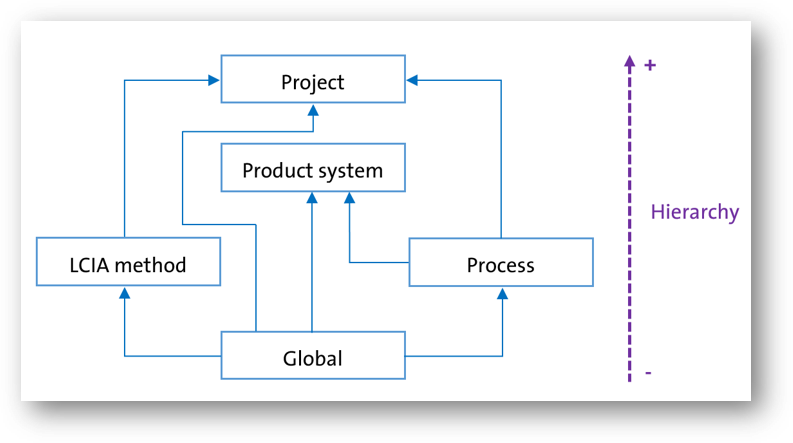
Hierarchy of parameters in openLCA
Source: openLCA 2 manual — Parameter hierarchy
Global parameters
In this first example, we parametrize the input exchange of a process with a global parameter.
# get the mass and volume flow properties from the database
number = db.getForName(FlowProperty, "Number")
mass = db.getForName(FlowProperty, "Mass")

# create an output product for the process
coffee_cup = Flow.product("Cup of coffee", number)
# create a process with the "Cup of coffee" as quantitative reference
coffee_brewing = Process.of("Coffee brewing", coffee_cup)

# create the input product flows: coffee
coffee = Flow.product("Coffee", mass)

# create the coffee exchange with a formula using a global parameter
coffee_input = Exchange.of(coffee)
# creating a global parameter for the coffee intensity
intensity = Parameter.global("intensity", 1.0)
intensity.description = "The intensity of the coffee brewing process (0-10)"
coffee_input.formula = "0.01 * " + intensity.name
# set the exchange default amount
coffee_input.amount = 0.01 * intensity.value
coffee_input.isInput = True
# add the exchange to the process
coffee_brewing.add(coffee_input)

# insert the process and the newly created flows into the database
db.insert(
    coffee_cup,
    coffee,
    intensity,
    coffee_brewing,
)

# refresh the navigator to see the new process
App.runInUI("Refresh navigator", lambda: Navigator.refresh())
Process parameters
In the next example, we parametrize the input exchange of a process with a process parameter.
# get the mass and volume flow properties from the database
number = db.getForName(FlowProperty, "Number")
mass = db.getForName(FlowProperty, "Mass")
volume = db.getForName(FlowProperty, "Volume")

# create an output product for the process
tea_cup = Flow.product("Cup of tea", number)
# create a process with the "Cup of tea" as quantitative reference
tea_brewing = Process.of("Tea brewing", tea_cup)
water = Flow.elementary("Water", volume)
tea_brewing.input(water, 0.0001)
tea = Flow.product("Tea", mass)
tea_brewing.input(tea, 0.01)

# create a milk exchange with a formula using a process parameter
milk = Flow.product("Milk", mass)
milk_input = Exchange.of(milk)
# creating a process parameter for the milk amount
with_milk = Parameter.process("with_milk", 0)
with_milk.description = "A boolean parameter to indicate if milk is added"
milk_input.formula = "0.005 * " + with_milk.name
# set the exchange default amount
milk_input.amount = 0.005 * with_milk.value
milk_input.isInput = True
# add the exchange to the process
tea_brewing.add(milk_input)
tea_brewing.parameters.add(with_milk)

# insert the process and the newly created flows into the database
# note that the with_milk parameter is not inserted as it is added to the
# milk_production process
db.insert(
    tea_cup,
    water,
    tea,
    milk,
    tea_brewing
)

# refresh the navigator to see the new process
App.runInUI("Refresh navigator", lambda: Navigator.refresh())
Add a default provider
In openLCA, a "provider" refers to the process that supplies a specific flow (the source or origin of a particular input or output flow). The provider information helps to establish the relationships and dependencies between different processes and flows within the LCA model, and makes the input / output unique. It can be overwritten in a product system, meaning that you can select a new, different connecting process in a product system.
Source: openLCA 2 manual — Inputs/Outputs
In this example, we create a process for the production of beer and add a default provider to the input exchange for the production of barley.
from org.openlca.core.model import ProviderType

# create a process for beer production
volume = db.getForName(FlowProperty, "Volume")
beer = Flow.product("Beer", volume)
beer_production = Process.of("Beer production", beer)
water = Flow.elementary("Water", volume)
beer_production.input(water, 1.0)

# add an input for barley
mass = db.getForName(FlowProperty, "Mass")
barley = Flow.product("Barley", mass)
barley_exchange = beer_production.input(barley, 0.42)

# create a process for barley production
process = Process.of("Barley production", barley)
# insert and get the process (the provider should be in the database before
# setting it as the default provider)
db.insert(barley, process)
barley_production = db.get(Process, process.refId)

# add a default provider for barley
barley_exchange.defaultProviderId = barley_production.id
barley_exchange.defaultProviderType = ProviderType.PROCESS

# insert the process into the database
db.insert(water, beer, beer_production)

# refresh the navigator
App.runInUI("Refresh navigator", lambda: Navigator.refresh())
Update exchange amount
Change the amount of an existing exchange by fetching the process, picking the exchange by its flow name and writing the process back.
# let's say we have the following process in the database
mass = db.getForName(FlowProperty, "Mass")
tomato = Flow.product("Tomato", mass)
tomato_production = Process.of("Tomato production", tomato)
db.insert(tomato, tomato_production)

# get the "Tomato production" process
process = db.get(Process, tomato_production.refId)

# get the exchange for "Tomato" by picking the first exchange with this name
tomato_exchange = next(e for e in process.exchanges if e.flow.name == "Tomato")

# update the amount
tomato_exchange.amount = 0.1
print(tomato_exchange)

# increase the version and update the last update date
Version.incUpdate(process)  # incMinor/incMajor to increase minor/major version
# update the process in the database
db.update(process)

# refresh the navigator to see the new process
App.runInUI("Refresh navigator", lambda: Navigator.refresh())
# Output:
#  Exchange [flow=RootEntity [type=Flow, refId=<UUID>, name=Tomato], input=false,amount=0.1, unit=Unit [id=<id>, name=kg]]
Move to a category
Assign a process to a category by setting its category field to a category you create (or reuse) with
CategoryDao.sync.
# create only categories that do not exist
# (Material production/Metal production)
process_category = CategoryDao.sync(
    db, ModelType.PROCESS, "Material production", "Metal production"
)

# creates a process and add its category
mass = db.getForName(FlowProperty, "Mass")
product = Flow.product("Silver", mass)
process = Process.of("Silver production", product)
process.category = process_category

# insert them in correct dependency order
db.insert(product, process)

# refresh the navigator
App.runInUI("Refresh navigator", lambda: Navigator.refresh())
Delete a process
Remove a process from the database by fetching it and passing it to db.delete.
# let's assume we want to delete the following process from the database
mass = db.getForName(FlowProperty, "Mass")
f = Flow.product("Flow", mass)
p = Process.of("Process", f)
uuid = p.refId
db.insert(f, p)

# get the process from the database
process = db.get(Process, uuid)

# delete the process from the database
db.delete(process)

# refresh the navigator
App.runInUI("Refresh navigator", lambda: Navigator.refresh())
Product system
Product systems are life cycle models and are used to calculate inventory results and impact assessment.
A "product system" is described by ISO 14040 as a "collection of unit processes with elementary and product flows, performing one or more defined functions, and which models the life cycle of a product." In openLCA a product system is a set of processes connected by flows, performing one or more defined functions and modelling the life cycle of a product. A product system has a reference process with a defined amount of the product (referred to the functional unit), which serves as basis for calculating impacts for all connected processes within the system.
Source: openLCA 2 manual — Product Systems
- Create from a process
- Get from the database
- Update with more info
- Add a parameter redefinition set
- Move to a category
- Delete a product system
Types of product systems
A process describes a single activity through its inputs and outputs around a quantitative reference. A product system goes one step further: it links many processes through their flows, starting from a reference process, so results can be calculated across the whole supply chain.
Product systems differ mainly in how they are built:
- Linked to unit or system processes — where no provider is set, the supply chain connects either to unit processes or to system processes (fully detailed steps versus an aggregated result saved as a process).
- Nested — a product system can itself serve as the provider for another, giving a "nested" product system whose sub-results show up in the overall analysis.
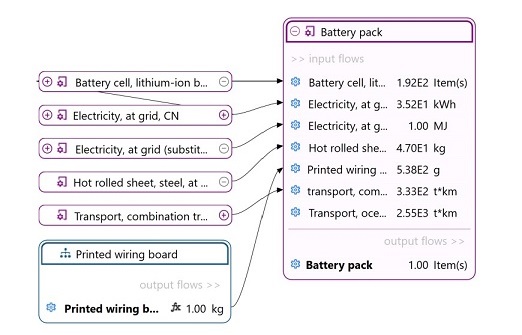
Example of a nested product system: the "Printed wiring board" product system feeds the "Battery pack" as a provider.
These are advanced topics; for the details see the openLCA 2 manual's advanced product systems features.
Create a product system
This code snippet creates a product system that represents the electrolysis of brine and produces sodium chloride.
A product system is built from a reference process — the process that models the last step of your
supply chain, or the last step of a specific chain. From there, the auto-linking function connects
input and output flows between processes to build up the supply chain. In the script below,
brine_electrolysis is the reference process passed to ProductSystemBuilder.
Source: openLCA 2 manual — Creating a new product system
Inputs:
- 4.2 kg of sodium chloride
- 42.0 m³ of water (elementary flow)
Outputs:
- 1.0 m³ of chlorine gas
# get the mass and volume flow properties from the database
mass = db.getForName(FlowProperty, "Mass")
volume = db.getForName(FlowProperty, "Volume")

# create an output product for the process
chlorine_gas = Flow.product("Chlorine gas", volume)

# create a process with the Chlorine gas as quantitative reference with the
# default amount of 1.0 m3
brine_electrolysis = Process.of("Brine electrolysis", chlorine_gas)

# create the input product flows: 4.2 kg of sodium chloride and 42.0 m3 of
# water
sodium_chloride = Flow.product("Sodium chloride", mass)
brine_electrolysis.input(sodium_chloride, 4.2)
water = Flow.elementary("Water", volume)
brine_electrolysis.input(water, 42.0)

# create process for the sodium chloride
sodium_chloride_production = Process.of(
  "Sodium chloride production",
  sodium_chloride
)

# insert the process and the newly created flows into the database
db.insert(
    chlorine_gas,
    sodium_chloride,
    water,
    sodium_chloride_production,
    brine_electrolysis
)

config = (
    LinkingConfig()
    .providerLinking(ProviderLinking.PREFER_DEFAULTS)
    .preferredType(LinkingConfig.PreferredType.UNIT_PROCESS)
)

system = ProductSystemBuilder(db, config).build(brine_electrolysis)

# insert the product system into the database
db.insert(system)

# refresh the navigator to see the new process
App.runInUI("Refresh navigator", lambda: Navigator.refresh())
The ProviderLinking indicates how default providers of product inputs or waste outputs in
processes should be considered in the linking of a product system. It can be one of:
IGNORE_DEFAULTS: Default provider settings are ignored in the linking process. This means that the linker can also select another provider even when a default provider is set.PREFER_DEFAULTS: When a default provider is set for a product input or waste output the linker will always select this process. For other exchanges it will select the provider according to its other rules.ONLY_DEFAULTS: Means that links should be created only for product inputs or waste outputs where a default provider is defined which are then linked exactly to this provider.
The PreferredType indicates which type of process should be used to link the product system. It
can be one of:
UNIT_PROCESS,SYSTEM_PROCESS,RESULT.
Get product systems from the database
You can retrieve a product system by its name or UUID, fetch its lightweight descriptor, or load every product system in the database at once.
# get and print the product system by name
product_system_by_name = db.getForName(ProductSystem, "Aluminium ingot")
print(product_system_by_name)

# get and print the product system by id (copy the UUID from the openLCA product system page)
product_system_by_id = db.get(ProductSystem, "UUID_of_the_product_system")
print(product_system_by_id)

# get and print the descriptor of a product system (smaller object)
product_system = db.getDescriptor(ProductSystem, "UUID_of_the_product_system")
print(product_system)

# get and print all the database product systems (can take a while)
product_systems = db.getAll(ProductSystem)
for product_system in product_systems:
    print(product_system)

# get and print all the database product system descriptors (can take a while)
product_system_descriptors = db.getDescriptors(ProductSystem)
for product_system_descriptor in product_system_descriptors:
    print(product_system_descriptor)
Update an existing product system (edit, add information, etc.)
To change a product system, fetch it from the database, edit its fields, bump its version and write it
back with db.update.
# let's say, a product system has been created and inserted in the database
mass = db.getForName(FlowProperty, "Mass")
aluminium = Flow.product("Aluminium ingot", mass)
process = Process.of("Aluminium production", aluminium)
product_system = ProductSystem.of("Aluminium production", process)
# get the product system UUID to retrieve it from the database
uuid = product_system.refId
db.insert(aluminium, process, product_system)

# get the product system from the database (the UUID can be copied from the
# product system page)
product_system = db.get(ProductSystem, uuid)

# add more information to the product system
product_system.description = "The process of aluminium production"
product_system.targetAmount = 42.0
# change the target unit from kg to g
# get unit from the flow property list of units
g = next(u for u in mass.unitGroup.units if u.name == "g")
product_system.targetUnit = g
product_system.cutoff = 12.3

# increase the version and update the last update date
Version.incUpdate(product_system)  # or incMinor/incMajor
# update the product system in the database
db.update(product_system)

# refresh the navigator to see the new product system
App.runInUI("Refresh navigator", lambda: Navigator.refresh())
Add a parameter redefinition set
openLCA lets you add so called "parameter sets", that allow the user to easily switch between parameter scenarios.
Source: openLCA 2 manual — Parameter sets
The following script builds a parametrized product system and defines two such scenarios
("Scenario 1" and "Scenario 2") as parameter redefinition sets (ParameterRedefSet).
# create a parametrized product system

number = db.getForName(FlowProperty, "Number")
mass = db.getForName(FlowProperty, "Mass")
volume = db.getForName(FlowProperty, "Volume")

# create an output product for the process
coffee_cup = Flow.product("Cup of coffee", number)
# create a process with the "Cup of coffee" as quantitative reference
coffee_brewing = Process.of("Coffee brewing", coffee_cup)

# create the input product flows: water, coffee
coffee = Flow.product("Coffee", mass)
water = db.getForName(Flow, "Water/m3")
coffee_brewing.input(water, 0.0001)

# create the coffee exchange with a formula using a global parameter
coffee_input = Exchange.of(coffee)
# creating a global parameter for the coffee intensity
intensity = Parameter.global("intensity", 1.0)
intensity.description = "The intensity of the coffee brewing process (0-10)"
coffee_input.formula = "0.01 * " + intensity.name
# set the exchange default amount
coffee_input.amount = 0.01 * intensity.value
coffee_input.isInput = True
# add the exchange to the process
coffee_brewing.add(coffee_input)

# create a process for the production of coffee
coffee_production = Process.of("Coffee production", coffee)
coffee_production.input(water, 0.1)

# create a milk exchange with a formula using a process parameter
milk = Flow.product("Milk", mass)
milk_input = Exchange.of(milk)
# creating a process parameter for the milk amount
with_milk = Parameter.process("with_milk", 0)
with_milk.description = "A boolean parameter to indicate if milk is added"
milk_input.formula = "0.005 * " + with_milk.name
# set the exchange default amount
milk_input.amount = 0.005 * with_milk.value
milk_input.isInput = True
# add the exchange to the process
coffee_brewing.add(milk_input)
# add the process parameter to the process
coffee_brewing.parameters.add(with_milk)

# create a process for the production of milk
milk_production = Process.of("Milk production", milk)
milk_production.input(water, 10)

# insert the process and the newly created flows into the database
# note that the with_milk parameter is not inserted as it is added to the
# milk_production process
db.insert(
    coffee_cup,
    coffee,
    milk,
    intensity,
    coffee_production,
    milk_production,
    coffee_brewing
)

# create a product system
system = ProductSystem.of("Coffee brewing", coffee_brewing)
# link the processes to the exchanges
system.link(coffee_production, coffee_brewing)
system.link(milk_production, coffee_brewing)

# create parameter redefinition sets

scenario_1 = ParameterRedefSet.of("Scenario 1", [
    ParameterRedef.of(intensity, 2),
    ParameterRedef.of(with_milk, coffee_brewing, 1.0),
])
scenario_2 = ParameterRedefSet.of("Scenario 2", [
    ParameterRedef.of(intensity, 8),
    ParameterRedef.of(with_milk, coffee_brewing, 0.0),
])

# add the parameter redefinition sets to the product system
system.parameterSets.add(scenario_1)
system.parameterSets.add(scenario_2)

# insert the product system in the database
db.insert(system)

# refresh the navigator to see the new process
App.runInUI("Refresh navigator", lambda: Navigator.refresh())
Move a product system to a category
Assign a product system to a category by setting its category field to a category you create (or
reuse) with CategoryDao.sync.
# create only categories that do not exist, the path is provided
product_system_category = CategoryDao.sync(
    db, ModelType.PRODUCT_SYSTEM, "2026", "March"
)

# creates a product, a process and a product system
mass = db.getForName(FlowProperty, "Mass")
product = Flow.product("Iron", mass)
process = Process.of("Iron production", product)
product_system = ProductSystem.of("Iron production", process)
product_system.category = product_system_category

# insert them in correct dependency order
db.insert(product, process, product_system)

# refresh the navigator
App.runInUI("Refresh navigator", lambda: Navigator.refresh())
Delete a product system
Remove a product system from the database by fetching it and passing it to db.delete.
# let's assume we want to delete the following product system from the database
mass = db.getForName(FlowProperty, "Mass")
f = Flow.product("Flow", mass)
p = Process.of("Process", f)
s = ProductSystem.of("Product system", p)
uuid = s.refId
db.insert(f, p, s)

# get the product system from the database
product_system = db.get(ProductSystem, uuid)

# delete the product system from the database
db.delete(product_system)

# refresh the navigator
App.runInUI("Refresh navigator", lambda: Navigator.refresh())
Impact method
Impact assessment methods are essential components of life cycle assessment. They quantify the potential environmental impacts associated with products, processes, or services. These methods analyse the data from the inventory phase and translate it into meaningful indicators. LCIA methods encompass a wide range of impact categories, like global warming potential, acidification, eutrophication, and human toxicity, provided typically with the idea of fostering businesses and individuals to make informed, sustainability-driven decisions that promote a greener and more responsible future.
Note: If you use the databases provided from openLCA Nexus, they often do not contain LCIA methods (called "impact assessment methods" in the software). This allows us to update databases and LCIA methods faster. Hence, the LCIA methods need to be imported by you in each database in openLCA to carry out life cycle impact assessment.
Source: openLCA 2 manual — LCIA methods
- Create from scratch
- Get impact method from the database
- Parametrize impact category
- Delete an impact method
Create an impact method from scratch
The following code snippets are probably not very useful. You will probably import LCIA methods into your database rather than creating them from scratch.
LCIA categories are stand-alone entities that are stored outside of an LCIA method. A single LCIA category can be used in several LCIA methods and an update of such an LCIA category will update it in all LCIA methods where it is used.
Source: openLCA 2 manual — Impact assessment category tab contents
The script below mirrors this structure: it creates an ImpactCategory, adds characterization factors
to it with impact_category.factor(flow, value), and then attaches the category to an ImpactMethod.
# get the mass flow property from the database to create elementary flows
mass = db.getForName(FlowProperty, "Mass")

# create a flow for the bromopropane and butane
bromopropane = Flow.elementary("Bromopropane", mass)
butane = Flow.elementary("Butane", mass)

# create an impact category
impact_category = ImpactCategory.of("Climate change", "kg CO2-Eq")

# add the impact factors for bromopropane and butane
impact_category.factor(bromopropane, 0.052)
impact_category.factor(butane, 0.006)

# create an impact method with (only) one impact category
impact_method = ImpactMethod.of("EF 3.0")
impact_method.add(impact_category)

# insert the datasets into the database
db.insert(bromopropane, butane, impact_category, impact_method)

# refresh the navigator to see the new flows
App.runInUI("Refresh navigator", lambda: Navigator.refresh())
Get impact method from the database
You can retrieve an impact method by its name or UUID, fetch its lightweight descriptor, or load every method in the database at once.
# get and print the impact method by name
impact_method_by_name = db.getForName(ImpactMethod, "AWARE")
print(impact_method_by_name)

# get and print the impact method by id (copy the UUID from the openLCA impact method page)
impact_method_by_id = db.get(ImpactMethod, "UUID_of_the_impact_method")
print(impact_method_by_id)

# get and print the descriptor of a impact method (smaller object)
impact_method = db.getDescriptor(ImpactMethod, "UUID_of_the_impact_method")
print(impact_method)

# get and print all the database impact methods (can take a while)
impact_methods = db.getAll(ImpactMethod)
for impact_method in impact_methods:
    print(impact_method)

# get and print all the database impact method descriptors (can take a while)
impact_method_descriptors = db.getDescriptors(ImpactMethod)
for impact_method_descriptor in impact_method_descriptors:
    print(impact_method_descriptor)
Parametrize impact category
Parameters can be used in the same way for LCIA categories as for processes.
Source: openLCA 2 manual — Parameters
# let's say we already have the following impact method in the database
# get the mass flow property from the database to create elementary flows
mass = db.getForName(FlowProperty, "Mass")
bromopropane = Flow.elementary("Bromopropane", mass)
butane = Flow.elementary("Butane", mass)
impact_category = ImpactCategory.of("Climate change", "kg CO2-Eq")
uuid = impact_category.refId
impact_category.factor(bromopropane, 0.052)
impact_category.factor(butane, 0.006)
impact_method = ImpactMethod.of("EF 3.0")
impact_method.add(impact_category)

# insert the datasets into the database
db.insert(bromopropane, butane, impact_category, impact_method)

# get the impact category from the database
category = db.get(ImpactCategory, uuid)

impact_factor = next(f for f in category.impactFactors if f.flow.name == "Bromopropane")
pressure = Parameter.impact("pressure", 1.01)
impact_factor.formula = "0.052 * " + pressure.name + " / 1.01"
impact_factor.value = 0.052 * pressure.value / 1.01
category.parameters.add(pressure)

# increase the version and update the last update date
Version.incUpdate(category)  # or incMinor/incMajor to increase minor/major version
# update the flow in the database
db.update(category)

# refresh the navigator to see the new flows
App.runInUI("Refresh navigator", lambda: Navigator.refresh())
Delete an impact method
Remove an impact method from the database by fetching it and passing it to db.delete.
# let's assume we want to delete the following impact method from the database
method = ImpactMethod.of("Impact method")
uuid = method.refId
db.insert(method)

# get the impact method from the database
impact_method = db.get(ImpactMethod, uuid)

# delete the impact method from the database
db.delete(impact_method)

# refresh the navigator
App.runInUI("Refresh navigator", lambda: Navigator.refresh())
Calculate
Calculating a product system produces its life cycle inventory and impact assessment results. You can customize the calculation according to your requirements: you can choose the allocation method, the impact assessment method, normalization and weighting set, the calculation type (lazy, eager or Monte Carlo simulation) or whether to include regionalized calculations, cost calculations or data quality.
Source: openLCA 2 manual — Calculation and Result Analysis
A ProductSystem and an ImpactMethod feed a CalculationSetup; SystemCalculator runs it and
returns an LcaResult.
- Simple calculation
- Parameter redefinitions
- Sensitivity analysis
- Parameter redefinition sets
- Normalization and weighting sets
- Extended calculation setup
- Advanced
Run a calculation
Load a product system and an impact method by UUID, build a calculation setup and run it to get the total value of the first impact category.
# retrieve an existing product system from the database
system = db.get(ProductSystem, "UUID_of_the_product_system")

# retrieve the impact method
method = db.get(ImpactMethod, "UUID_of_the_impact_method")

# create the calculation setup
setup = CalculationSetup.of(system).withImpactMethod(method)
# run the calculation
result = SystemCalculator(db).calculate(setup)

# get the total impact value for the first impact category
impact = next(cat for cat in method.impactCategories)
value = result.getTotalImpactValueOf(Descriptor.of(impact))
print(
    "The total impact on %s for %s is %.3f %s."
    % (impact.name, system.name, value, impact.referenceUnit))
# Output:
#  The total impact on Water use for Coffee brewing is 0.004 m3.
Parameter redefinitions
Create a parametrized product system
First, build a small product system whose exchanges reference a global parameter (intensity) and a
process parameter (with_milk).
number = db.getForName(FlowProperty, "Number")
mass = db.getForName(FlowProperty, "Mass")
volume = db.getForName(FlowProperty, "Volume")

# create an output product for the process
coffee_cup = Flow.product("Cup of coffee", number)
# create a process with the "Cup of coffee" as quantitative reference
coffee_brewing = Process.of("Coffee brewing", coffee_cup)

# create the input product flows: water, coffee
coffee = Flow.product("Coffee", mass)
water = db.getForName(Flow, "Water/m3")
coffee_brewing.input(water, 0.0001)

# create the coffee exchange with a formula using a global parameter
coffee_input = Exchange.of(coffee)
# creating a global parameter for the coffee intensity
intensity = Parameter.global("intensity", 1.0)
intensity.description = "The intensity of the coffee brewing process (0-10)"
coffee_input.formula = "0.01 * " + intensity.name
# set the exchange default amount
coffee_input.amount = 0.01 * intensity.value
coffee_input.isInput = True
# add the exchange to the process
coffee_brewing.add(coffee_input)

# create a process for the production of coffee
coffee_production = Process.of("Coffee production", coffee)
coffee_production.input(water, 0.1)

# create a milk exchange with a formula using a process parameter
milk = Flow.product("Milk", mass)
milk_input = Exchange.of(milk)
# creating a process parameter for the milk amount
with_milk = Parameter.process("with_milk", 0)
with_milk.description = "A boolean parameter to indicate if milk is added"
milk_input.formula = "0.005 * " + with_milk.name
# set the exchange default amount
milk_input.amount = 0.005 * with_milk.value
milk_input.isInput = True
# add the exchange to the process
coffee_brewing.add(milk_input)
# add the process parameter to the process
coffee_brewing.parameters.add(with_milk)

# create a process for the production of milk
milk_production = Process.of("Milk production", milk)
milk_production.input(water, 10)

# insert the process and the newly created flows into the database
# note that the with_milk parameter is not inserted as it is added to the
# milk_production process
db.insert(
    coffee_cup,
    coffee,
    milk,
    intensity,
    coffee_production,
    milk_production,
    coffee_brewing
)

# create a product system
system = ProductSystem.of("Coffee brewing", coffee_brewing)
# link the processes to the exchanges
system.link(coffee_production, coffee_brewing)
system.link(milk_production, coffee_brewing)

# insert the product system in the database
db.insert(system)

# refresh the navigator to see the new process
App.runInUI("Refresh navigator", lambda: Navigator.refresh())
Run the calculation with parameter redefinitions
Then calculate that system while overriding those parameters for this run with ParameterRedef
values.
# retrieve an existing product system from the database
system = db.getForName(ProductSystem, "Coffee brewing")

# retrieve the impact method
method = db.getForName(ImpactMethod, "AWARE")

# get the intensity parameter
intensity = db.getForName(Parameter, "intensity")

# get the with_milk process parameter and the corresponding process
with_milk = db.getForName(Parameter, "with_milk")
coffee_brewing = db.getForName(Process, "Coffee brewing")

# run the calculation with the parameter redefinitions
setup = (
    CalculationSetup.of(system)
        .withImpactMethod(method)
        .withParameters([
            ParameterRedef.of(intensity, 4.2),
            ParameterRedef.of(with_milk, coffee_brewing, 1.0),
        ])
)

result = SystemCalculator(db).calculate(setup)

# get the total impact value for the first impact category
impact = next(cat for cat in method.impactCategories)
value = result.getTotalImpactValueOf(Descriptor.of(impact))
print(
    "The total impact on %s for %s is %.3f %s."
    % (impact.name, system.name, value, impact.referenceUnit)
)
# Output:
#  The total impact on Water use for Coffee brewing is 2.332 m3.
Sensitivity analysis
A sensitivity analysis lets you change given parameter variable(s) across different iterations to see how the results respond.
Source: openLCA 2 manual — Parameter analysis
In this example, we will run a sensitivity analysis on the model created in Parameter redefinitions.
# retrieve an existing product system from the database
system = db.getForName(ProductSystem, "Coffee brewing")

# retrieve the impact method
method = db.getForName(ImpactMethod, "AWARE")

# target parameters
intensity = db.getForName(Parameter, "intensity")
with_milk = db.getForName(Parameter, "with_milk")
# process (scope) of the with_milk parameter
coffee_brewing = db.getForName(Process, "Coffee brewing")

# pick the first impact category of the impact method
impact = next(cat for cat in method.impactCategories)
# r is a dictionary of the form {(intensity, with_milk): value}
r = {}
# run the analysis over a range of intensity, with (1) or without (0) milk
for m in [0, 1]:
    for i in [0, 2, 4, 6, 8, 10]:
        parameters = [
            ParameterRedef.of(intensity, i),
            ParameterRedef.of(with_milk, coffee_brewing, m),
        ]
        setup = (
            CalculationSetup.of(system)
            .withImpactMethod(method)
            .withParameters(parameters)
        )
        result = SystemCalculator(db).calculate(setup)
        value = result.getTotalImpactValueOf(Descriptor.of(impact))

        r[(i, m)] = value

# print the results
keys = sorted(r.keys())
print("%10s %10s %20s" % ("Intensity", "Milk", impact.name))
for (i, m) in keys:
    milk = "No" if m == 0 else "Yes"
    print("%10d %10s %20s" % (i, milk, r[(i, m)]))
# Output:
#   Intensity       Milk            Water use
#           0         No             0.004295
#           0        Yes             2.151795
#           2         No             0.090195
#           2        Yes             2.237695
#           4         No             0.176095
#           4        Yes             2.323595
#           6         No             0.261995
#           6        Yes             2.409495
#           8         No             0.347895
#           8        Yes             2.495395
#          10         No             0.433795
#          10        Yes             2.581295
Calculation with parameter redefinition sets
Instead of creating a new parameter redefinition set when running a calculation, you can select one of the product system parameter redefinition sets and use it in the calculation setup.
Create a product system with parameter redefinition sets
Copy and paste the code from Add a parameter redefinition set.
Run the calculation with a parameter redefinition set
Pick one of the product system's saved parameter sets by name and pass its redefinitions into the calculation setup.
# retrieve an existing product system from the database
system = db.getForName(ProductSystem, "Coffee brewing")

# retrieve the impact method
method = db.getForName(ImpactMethod, "AWARE")

# run the calculation with the parameter redefinitions set named "Scenario 1"
# retrieve the parameter redefinition set from the product system
parameter_set = next(set for set in system.parameterSets if set.name == "Scenario 1")
setup = (
    CalculationSetup.of(system)
        .withImpactMethod(method)
        .withParameterSetName(parameter_set.name)
        .withParameters(parameter_set.parameters)
)

result = SystemCalculator(db).calculate(setup)

# get the total impact value for the first impact category
impact = next(cat for cat in method.impactCategories)
value = result.getTotalImpactValueOf(Descriptor.of(impact))
print(
    "The total impact on %s for %s is %.3f %s."
    % (impact.name, system.name, value, impact.referenceUnit)
)
Normalization and weighting sets
You can select a normalization or weighting set for your values. This set needs to be present in the impact assessment method.
Source: openLCA 2 manual — Calculation and Result Analysis
The withNwSet method allows to specify a normalization and weighting set. The normalization and
weighting set can be retrieved from the impact method.
# retrieve an existing product system from the database
system = db.get(ProductSystem, "UUID_of_the_product_system")

# retrieve the impact method
method = db.getForName(ImpactMethod, "EF 3.1 Method (adapted)")

# retrieve the normalization and weighting set
nw_sets = method.nwSets
nw_set = next(
    nw_sets for nw_sets in nw_sets if nw_sets.name == "EF 3.1 normalization and weighting set"
)

setup = (
    CalculationSetup.of(system)
        .withImpactMethod(method)
        .withNwSet(nw_set)
)

result = SystemCalculator(db).calculate(setup)

# get the normalized impact value for Water use
impacts = result.getTotalImpacts()
factors = NwSetTable.of(db, nw_set)
normalized_impacts = factors.normalize(impacts)
weighted_impacts = factors.weight(impacts)
normalized_impact = next(i for i in normalized_impacts if i.impact().name == "Water use")
weighted_impact = next(i for i in weighted_impacts if i.impact().name == "Water use")
print(
    "The normalized impact on %s for %s is %.6f."
    % (normalized_impact.impact().name, system.name, normalized_impact.value())
)
print(
    "The weighted impact on %s for %s is %.6f."
    % (weighted_impact.impact().name, system.name, weighted_impact.value())
)
Extended calculation setup
The calculation setup can be configured by adding the with... methods.
Allocation method
When a process involves several products, you have to assign how much of the impact each product is responsible for.
Source: openLCA 2 manual — Allocation
The allocation method can be selected among the following options:
AllocationMethod.USE_DEFAULT,AllocationMethod.CAUSAL,AllocationMethod.ECONOMIC,AllocationMethod.NONE,AllocationMethod.PHYSICAL
The default allocation method is AllocationMethod.USE_DEFAULT. To use a different allocation
method, you can use the withAllocationMethod method:
# retrieve an existing product system and method from the database
system = db.get(ProductSystem, "UUID_of_the_product_system")
method = db.getForName(ImpactMethod, "AWARE")

# create the calculation setup with the economic allocation method
setup = (
    CalculationSetup.of(system)
        .withImpactMethod(method)
        .withAllocationMethod(AllocationMethod.ECONOMIC)
)

result = SystemCalculator(db).calculate(setup)
Costs
When running an LCC (Life Cycle Costing) calculation on a product system with costs, the costs can
be included in the calculation with the withCosts method:
# retrieve an existing product system and method from the database
system = db.get(ProductSystem, "UUID_of_the_product_system")
method = db.getForName(ImpactMethod, "AWARE")

# create the calculation setup with the economic allocation method
setup = (
    CalculationSetup.of(system)
        .withImpactMethod(method)
        .withCosts(True)
)

result = SystemCalculator(db).calculate(setup)
Regionalization
With openLCA you can perform regionalized impact assessment, accounting for specific conditions and
characteristics of the location where the processes occur. To enable regionalization, you can use
the withRegionalization method:
# retrieve an existing product system and method from the database
system = db.get(ProductSystem, "UUID_of_the_product_system")
method = db.getForName(ImpactMethod, "AWARE")

# create the calculation setup with the economic allocation method
setup = (
    CalculationSetup.of(system)
        .withImpactMethod(method)
        .withRegionalization(True)
)

result = SystemCalculator(db).calculate(setup)
Advanced
- Technosphere flows
- Intervention flows
- Impact categories
- Contribution tree
- Costs
- Analysis groups
- Sankey graph
LcaResult object
The result of the calculation is a LcaResult object. It provides an interface for accessing impact
factors, total flows, and contributions and many other objects in a structured way. The manual won't
cover all the accessible methods of the LcaResult object. For more information, please refer to
the
class
itself.
For the following examples, let's assume we have calculated the results of a product system under
the Python variable result.
Technosphere flows
To retrieve the technosphere matrix, use the techIndex method. It will return an iterator of
TechFlows, namely a TechIndex. It maps symmetrically the rows (products or wastes) and columns
(process, product systems, ...) of the technology matrix. A TechFlow is a record that contains a
provider() (the descriptor of a Process) and a flow() (as a descriptor as well).
NOTE: More information about
RootDescriptorandFlowDescriptorcan be found in the Meta classes chapter.
tech_index = result.techIndex()
# loop over the tech flows
for tech_flow in tech_index:
    print(
        "Provider[%s] Flow: [%s]\n" % (tech_flow.provider().name, tech_flow.flow().name)
    )
Total requirements
To get the total requirements of a technosphere flow, we use the getTotalRequirementsOf method. It
will return the total amount of the flow required by the corresponding provider.
tech_index = result.techIndex()
for tech_flow in tech_index:
    print(
        "The flow %s (Provider[%s]) requires a total amount of %s\n"
        % (
            tech_flow.flow().name,
            tech_flow.provider().name,
            result.getTotalRequirementsOf(tech_flow),
        )
    )
Scaled technosphere flows
The scaled technosphere flows of a process are the scaled inputs and outputs of the linked product
and waste flows of that process related to the final demand of the product system. They can be
obtained with the getScaledTechFlowsOf method. It will return a list of TechFlowValue, which is
a record that contains a techFlow() (see TechFlow above) and a value() (the scaled amount of
the flow).
For example, to get the scaled technosphere flows amount of the first process in the technosphere matrix:
tech_index = result.techIndex()
for tech_flow in tech_index:
    print(
        "Provider[%s] Flow[%s]" % (tech_flow.provider().name, tech_flow.flow().name)
    )
    scaled_tech_flows = result.getScaledTechFlowsOf(tech_flow)
    for tech_flow_value in scaled_tech_flows:
        print(
            "  The scaled amount of %s is %s."
            % (tech_flow_value.techFlow().flow().name, tech_flow_value.value())
        )
Unscaled technosphere flows
The unscaled requirements of a process are the direct requirements of the process related to the quantitative reference of that process without applying a scaling factor. For example, the unscaled amount of the flows of the last column:
tech_index = result.techIndex()
for tech_flow in tech_index:
    print(
        "Provider[%s] Flow[%s]" % (tech_flow.provider().name, tech_flow.flow().name)
    )
    unscaled_tech_flows = result.getUnscaledTechFlowsOf(tech_flow)
    for tech_flow_value in unscaled_tech_flows:
        print(
            "  The unscaled amount of %s is %s."
            % (tech_flow_value.techFlow().flow().name, tech_flow_value.value())
        )
For more...
For more specific methods, please refer to the
LcaResult class.
Intervention flows
The intervention flows are the flows that cross the boundary with the environment of the calculated
system (this is why the short name is EnviFlow).
To retrieve the intervention matrix, we use the enviIndex method. It will return an iterator of
EnviFlows: EnviIndex, which maps symmetrically the rows (intervention flows) and columns
(technosphere flows). An EnviFlow is a record that contains a flow() (the descriptor of a
Flow), a location() (as a descriptor as well), and isInput() (a boolean that indicates whether
the flow is an input or an output).
NOTE: More information about
LocationDescriptorandFlowDescriptorcan be found in the Meta classes chapter.
envi_index = result.enviIndex()
# loop over all the intervention flows
for envi_flow in envi_index:
    print(
        "Flow[%s] Is input?[%s] Location[%s]\n"
        % (envi_flow.flow().name, envi_flow.isInput(), envi_flow.location())
    )
Inventory results
To get the inventory results, the quantitative list of all the material and energy flows into and
out of the system boundary, we use the getTotalFlows method. It will return a list of
EnviFlowValue, which is a record of an EnviFlow (enviFlow()) and value() the amount of the
flow.
envi_flow_values = result.getTotalFlows()
for envi_flow_value in envi_flow_values:
    in_or_out = "input" if envi_flow_value.isInput() else "output"
    print(
        "The total amount of the %s %s is %s."
        % (in_or_out, envi_flow_value.flow().name, envi_flow_value.value())
    )
Direct contributions
To get the direct contributions of a each process to the inventory result of a flow, we use the
getDirectFlowValuesOf method. It will return a list of TechFlowValue.
envi_index = result.enviIndex()
for envi_flow in envi_index:
    print(
        "Flow[%s] Is input?[%s] Location[%s]"
        % (envi_flow.flow().name, envi_flow.isInput(), envi_flow.location())
    )
    contributions = result.getDirectFlowValuesOf(envi_flow)
    for contribution in contributions:
        print(
            "  The contribution of %s is %s."
            % (contribution.techFlow().flow().name, contribution.value())
        )
Total values
The total value of a flow for a given process is the total inventory result at this point of the supply chain. It includes the direct, upstream, and downstream (related to waste treatment) contributions.
envi_index = result.enviIndex()
for envi_flow in envi_index:
    print(
        "Flow[%s] Is input?[%s] Location[%s]"
        % (envi_flow.flow().name, envi_flow.isInput(), envi_flow.location())
    )
    total_values = result.getTotalFlowValuesOf(envi_flow)
    for total_value in total_values:
        print(
            "  The total value for %s is %s."
            % (total_value.techFlow().flow().name, total_value.value())
        )
Direct process results
The direct process results are the direct intervention flows of a process to fulfill the demand of the product system.
tech_index = result.techIndex()
for tech_flow in tech_index:
    print(
        "Provider[%s] Flow[%s]" % (tech_flow.provider().name, tech_flow.flow().name)
    )
    envi_flow_values = result.getDirectFlowsOf(tech_flow)
    for envi_flow_value in envi_flow_values:
        print(
            "  The direct amount of %s is %s."
            % (envi_flow_value.enviFlow().flow().name, envi_flow_value.value())
        )
And more...
For more specific methods, please refer to the
LcaResult class.
Impact categories
Impact assessment result
In order to get the results of an impact assessment, we use the getTotalImpacts method. It will
return a list of ImpactValues. An ImpactValue provides two methods: impact() that describes
the impact category and value().
NOTE: More information about
ImpactDescriptorcan be found in the Meta classes chapter.
impacts = result.getTotalImpacts()
for impact in impacts:
    print(
        "The total impact on %s is %s %s."
        % (
            impact.impact().name,
            impact.value(),
            impact.impact().referenceUnit,
        )
    )
Normalized impact assessment result
In order to get the normalized results of an impact assessment, we use the normalize method of the
NwSetTable:
impacts = result.getTotalImpacts()

# retrieve the normalization and weighting set table
assert setup.nwSet() is not None
factors = NwSetTable.of(db, setup.nwSet())

# calculate the normalized impacts
normalized_impacts = factors.normalize(impacts)

for impact in normalized_impacts:
    print(
        "The normalized impact on %s is %s."
        % (
            impact.impact().name,
            impact.value(),
        )
    )
Weighted impact assessment result
In order to get the weighted results of an impact assessment, we use the weight method of the
NwSetTable:
impacts = result.getTotalImpacts()

# retrieve the normalization and weighting set
assert setup.nwSet() is not None
factors = NwSetTable.of(db, setup.nwSet())

# calculate the weighted impacts
weighted_impact_values = factors.weight(impacts)
for impact in weighted_impact_values:
    print(
        "The weighted impact on %s is %s."
        % (
            impact.impact().name,
            impact.value(),
        )
    )
Direct contributions
To get the direct contributions of a each process to the impact result of an impact category, we use
the getDirectImpactValuesOf method. It will return a list of TechFlowValue.
# retrieve the first impact category
category = method.impactCategories[0]
contributions = result.getDirectImpactValuesOf(Descriptor.of(category))
for contribution in contributions:
    print(
        "The contribution of %s in %s is %s ."
        % (
            contribution.techFlow().flow().name,
            contribution.techFlow().provider().name,
            contribution.value(),
        )
    )
Direct process results
The direct process results are the direct impacts of a process in the calculated product system. We
use the getDirectImpactsOf method. It will return a list of ImpactValues.
tech_index = result.techIndex()
# loop over the technosphere flows
for tech_flow in tech_index:
    print(
        "Provider[%s] Flow[%s]" % (tech_flow.provider().name, tech_flow.flow().name)
    )
    impacts = result.getDirectImpactsOf(tech_flow)
    for impact in impacts:
        print(
            "  The direct impact on %s is %s %s."
            % (
                impact.impact().name,
                impact.value(),
                impact.impact().referenceUnit,
            )
        )
Total process results
The total process results are the total impacts of a process in the calculated product system at the
stage of the supply chain. It takes into account the direct, upstream, and downstream impacts. We
use the getTotalImpactsOf method. It will return a list of ImpactValues.
tech_index = result.techIndex()
for tech_flow in tech_index:
    print(
        "Provider[%s] Flow[%s]" % (tech_flow.provider().name, tech_flow.flow().name)
    )
    impacts = result.getTotalImpactsOf(tech_flow)
    for impact in impacts:
        print(
            "  The total impact on %s is %s %s."
            % (
                impact.impact().name,
                impact.value(),
                impact.impact().referenceUnit,
            )
        )
Contribution tree
As you probably know from using the Contribution tree tab in openLCA, it is a visual representation of the environmental impacts of a system across its entire supply chain. It helps identify which stages of the life cycle contribute most to the overall environmental impact.
The contribution tree can be obtained from the LcaResult object by using the UpstreamTree.of
method. It takes a ResultProvider as well as an EnviFlow or ImpactDescriptor (see
Meta classes) object as input. Let's build one:
Getting an upstream tree
Build the tree from the result provider and the descriptor of the impact category you want to inspect.
# retrieve the first impact category
category = method.impactCategories[0]
tree = UpstreamTree.of(result.provider(), Descriptor.of(category))
The UpstreamTree is composed of UpstreamNode objects. Each UpstreamNode provides different
types of result and the provider (TechFlow). The root node of the tree can be retrieved via the
UpstreamTree.root attribute. And the children of a node can be retrieved via the
UpstreamTree.childs method.
provider(): Returns the provider of the product output or waste input of this upstream tree node.result(): Returns the upstream result of this node.requiredAmount(): Returns the required amount of the provider flow of this upstream node.scalingFactor(): Returns the scaling factor of this upstream node.directContribution(): Returns the direct contribution of the process (tech-flow) of the node to the total result the node.
Traversing the tree, breath-first
The tree can be traversed using the UpstreamTree.childs method recursively. A good practice is to
set a maximum depth to avoid long computation times.
# retrieve the first impact category
category = method.impactCategories[0]
tree = UpstreamTree.of(result.provider(), Descriptor.of(category))

DEPTH = 5
UNIT = category.referenceUnit

def traverse(tree, node, depth):
    if depth == 0:
        return
    print(
        "%sThe impact result of %s is %s %s (%s%%)."
        % (
            "  " * (DEPTH - depth),
            node.provider().provider().name,
            node.result(),
            UNIT,
            node.result() / tree.root.result() * 100,
        )
    )
    # recursively traverse the tree
    for child in tree.childs(node):
        traverse(tree, child, depth - 1)


traverse(tree, tree.root, DEPTH)
Costs
The LCC (Life Cycle Costing) results are only available if the system has been calculated with the
withCosts(True) method applied.
Life cycle costing result
To get the life cycle costing results, we use the getTotalCosts method. It will return the total
cost of the system as a float.
# retrieve the currency name from the system reference exchange
currency = system.referenceExchange.currency.name
total_cost = result.getTotalCosts()
print("The total cost of the system is %s %s." % (total_cost, currency))
Direct contributions
Similar to the direct contributions of the inventory, we can get the direct contributions of a
process to the life cycle cost of the system with the getDirectCostValues method. It will return a
list of TechFlowValue. For example:
currency = system.referenceExchange.currency.name
contributions = result.getDirectCostValues()
for contribution in contributions:
    print(
        "The contribution of %s in %s is %s %s."
        % (
            contribution.techFlow().flow().name,
            contribution.techFlow().provider().name,
            contribution.value(),
            currency,
        )
    )
Total values
Similar to the total values of the inventory, we can get the total costs of a process at a point in the supply chain. It will take into account the direct, upstream and downstream costs.
currency = system.referenceExchange.currency.name
total_costs = result.getTotalCostValues()
for total_cost in total_costs:
    print(
        "The total cost of %s in %s is %s %s."
        % (
            total_cost.flow().name,
            total_cost.provider().name,
            total_cost.value(),
            currency,
        )
    )
Analysis groups
With analysis groups, you can categorize your product system's processes into various categories allowing later to group results. This is particularly helpful if you assign groups according to the EN15804+A2 modules as used for EPDs. Moreover, it allows you to analyze life cycle stages without changing the connectivity within the model graph.
Source: openLCA 2 manual — Analysis groups
Get the analysis groups
The AnalysisGroup object contains the name and color of the analysis group and a set of
processes IDs.
You can get the analysis groups information from the product system as follows:
# import the HashSet class to work with the set of processes
from java.util import HashSet

for group in system.analysisGroups:
    print("%s (%s)" % (group.name, group.color))
    # loop over the set of processes
    for process in HashSet(group.processes):
        print(" - %s" % process)
Get the results for an analysis group
You can get the results for an analysis group as follows:
# create the analysis group result from the LcaResult
grouped_result = AnalysisGroupResult.of(system, result)
for category in method.impactCategories:
    impact_values = grouped_result.getResultsOf(Descriptor.of(category))
    # The Top group is gather the impact of processes not in any analysis group: the "Rest"
    print(
        "%s (Rest: %s %s):"
        % (category.name, impact_values.get("Top"), category.referenceUnit)
    )
    for group in system.analysisGroups:
        print(
            " - %s: %s %s"
            % (group.name, impact_values.get(group.name), category.referenceUnit)
        )
Sankey graph
The Sankey diagram visually represents the impacts of processes within the product system on specific flows/impact categories. The diagram shows both the direct contribution and the upstream total contribution of the process.
Source: openLCA 2 manual — Sankey diagram
openLCA provides an API to gather all the data necessary to create a Sankey graph. The Sankey
class provides methods to gather this data. The Sankey diagram can be created to show the flow of
material as well as impacts in the product system. Here is an example of how to extract the data for
a maximum number of nodes MAX_NODES and a minimum share (relative impact of a provider on the
total impacts) MIN_SHARE.
from java.util.function import Consumer
from org.openlca.app.util import Labels

# first step is to build the Sankey diagram:
MAX_NODES = 50
MIN_SHARE = 0.1

# retrieve the first impact category
category_descriptor = Descriptor.of(method.impactCategories[0])

# build the Sankey object
sankey = (
    Sankey.of(category_descriptor, result.provider())
    .withMinimumShare(MIN_SHARE)
    .withMaximumNodeCount(MAX_NODES)
    .build()
)

# The Sankey diagram can then be traversed to get the data for each node. For that, we use a
# consumer method (this is quite specific to Java). The consumer method accepts the `Sankey.Node`
# object and execute some operations with it.

class AddNodeConsumer(Consumer):
    def accept(self, node):  # type: (Sankey.Node) -> None
        print("\n %s" % (Labels.name(node.product)))
        print(" ID: %s" % (node.product.provider().id))
        print(" Total impact: %s" % (node.total))
        print(" Direct impact: %s" % (node.direct))
        print(" Relative share: %s" % (node.share))
        print(" Cutoff: %s" % (MIN_SHARE))
        print(" Providers:")
        for n in node.providers:
            print("  %s" % (n.product.provider().id))

sankey.traverse(AddNodeConsumer())
Excel
You can read and write Excel files from openLCA. This is done using the Apache POI library.
Read
The following code snippet shows how to open an Excel file and read the first cell of the first sheet:
from java.io import File
from org.apache.poi.ss.usermodel import WorkbookFactory

# read an Excel file from the following path
PATH = "/path/to/file.xlsx"

# load the workbook from the file
workbook = WorkbookFactory.create(File(PATH))

# get the first sheet (indices are 0 based)
sheet = workbook.getSheetAt(0)

# use the Excel utility to read values from the sheet
# the indices of rows and columns are 0 based
row = 0
column = 0
# read a string value from a cell
string = Excel.getString(sheet, row, column)
print("String value of cell A1: %s" % string)

# read a numeric value from a cell
number = Excel.getDouble(sheet, row + 1, column + 1)
print("Numeric value of cell B2: %d" % number)

# close the workbook to clean up resources
workbook.close()

# refresh the navigator (it does not do anything in this example as nothing was inserted into the
# database)
App.runInUI("Refresh navigator", lambda: Navigator.refresh())
Write
The example below shows how to create an Excel file and write its first cell.
from java.io import FileOutputStream
from org.apache.poi.ss.usermodel import WorkbookFactory

# path where the Excel file will be written
PATH = "/path/to/file.xlsx"

# load the workbook from the file
workbook = WorkbookFactory.create(True)

# create a new sheet
sheet = workbook.createSheet()

# create the first row (index 0) and first cell (index 0)
# and set a string value inside it
row = sheet.createRow(0)
cell = row.createCell(0)
cell.setCellValue("Hello from openLCA!")

# write the workbook content to the file
output_stream = FileOutputStream(PATH)
workbook.write(output_stream)

# close the output stream to ensure data is properly saved
output_stream.close()

# close the workbook to free resources
workbook.close()
Cheat sheet
Some useful tricks to make your life easier.
Shortcut keys
| Action | Windows / Linux | macOS |
|---|---|---|
| Run code | Ctrl + Shift + Enter | Ctrl + Shift + Enter |
| Cut line / selection | Ctrl + X | Cmd + X |
| Copy line / selection | Ctrl + C | Cmd + C |
| Paste line / selection | Ctrl + V | Cmd + V |
| Insert line below current line | Ctrl + Enter | Cmd + Enter |
| Comment or uncomment a line or a selection | Ctrl + / | Cmd + / |
Update the navigator
Refresh the navigator tree so freshly inserted or deleted datasets show up.
App.runInUI("Refresh navigator", lambda: Navigator.refresh())
Clear the console
Clear the openLCA console output from a script by finding the console and calling clearConsole.
from org.eclipse.ui.console import ConsolePlugin

consoles = ConsolePlugin.getDefault().getConsoleManager().getConsoles()
console = next(c for c in consoles if c.getName() == "openLCA")
console.clearConsole()
Optional
The following code snippets are probably not very useful. Your database is probably already populated with flow properties and unit groups if you have created it with Units and flow properties or with Complete reference data.
Create units and a unit group
All quantitative amounts of the inputs and outputs in a process have a unit of measurement. In openLCA convertible units are organized in groups that have a reference unit to which the conversion factors of the units are related.
A unit group is a collection of units for a given flow property.
Source: openLCA 2 manual — Database elements
# create units for our mass unit group with a name and a conversion factor
kg = Unit.of("kg", 1.0)
g = Unit.of("g", 0.001)

# create a unit group with kilogram as reference unit
units_of_mass = UnitGroup.of("Unit of mass", kg)

# add the unit to the unit group list of units
units_of_mass.units.add(kg)
units_of_mass.units.add(g)

# insert the unit group into the database (no need to insert the units)
db.insert(units_of_mass)

# refresh the navigator to see the new unit group
App.runInUI("Refresh navigator", lambda: Navigator.refresh())
Create a flow property
A flow in openLCA has physical properties (like mass or volume), called flow properties, in which the amount of a flow in a process exchange can be specified.
The following example creates a flow property for mass.
# create a unit group for mass
kg = Unit.of("kg", 1.0)
units_of_mass = UnitGroup.of("Unit of mass", kg)
g = Unit.of("g", 0.001)
units_of_mass.units.add(g)

# create a flow property with the default flow property type PHYSICAL
mass = FlowProperty.of("Mass", units_of_mass)

# insert the flow property and the unit group into the database
db.insert(units_of_mass, mass)

# refresh the navigator to see the new flow property
App.runInUI("Refresh navigator", lambda: Navigator.refresh())
When creating an economic flow property, set the flow property type to ECONOMIC.
# create a unit group for market value
dollar = Unit.of("USD", 1.0)
units_of_currency = UnitGroup.of("Unit of currency", dollar)
euro = Unit.of("EUR", 0.86)
units_of_currency.units.add(euro)

# create a flow property with the flow property type ECONOMIC
market_value = FlowProperty.of("Market value", units_of_currency)
market_value.flowPropertyType = FlowPropertyType.ECONOMIC

# insert the flow property and the unit group into the database
db.insert(units_of_currency, market_value)

# refresh the navigator to see the new flow property
App.runInUI("Refresh navigator", lambda: Navigator.refresh())
Advanced
- More database functions
- Running SQL queries
- Interacting with the openLCA UI
- Available classes and imports
- Create modules
- Meta classes
- To go further
More database functions
db has its own limits when it comes to getting datasets with a specific name. To get a list of the
datasets with a specific name, you can use the model DAO. Each model has its own model DAO:
ProcessDao, FlowDao, ProductSystemDao, etc.
DAO can be used with the following methods:
ModelDao(db).getForName(name)gets all the datasets with the namenameModelDao(db).getAll()gets all the datasetsModelDao(db).deleteAll()deletes all the datasets (use with caution)
For example, to get all the processes with the name Aluminium smelting:
processes = ProcessDao(db).getForName('Aluminium smelting')
Running SQL queries
You can run SQL queries on the database using the NativeSql class. You will need to create a
handler function to collect the results that return True to continue the query, or False to stop
it.
For example to collect all the processes that have Trichlorofluoromethane as output:
flows = FlowDao(db).getForName('Trichlorofluoromethane')
processes = []  # List[str]

def collect_results(record):
    process = db.get(Process, record.getLong(1))
    processes.append(process.name)
    return True

for flow in flows:
    query = (
        "SELECT f_owner FROM tbl_exchanges WHERE f_flow = %i AND is_input = 0"
        % flow.id
    )
    NativeSql.on(db).query(query, collect_results)

print("\n".join(processes))
Interacting with the openLCA UI
The script is executed in the same Java process as openLCA. Thus, you have access to all the things that you can do with openLCA via this scripting API (and also to everything that you can do with the Java and Jython runtime). Here is a small example script that will show the information message box when you execute it in openLCA:
from org.openlca.app.util import MsgBox

MsgBox.info("Hello from Python (Jython)!")
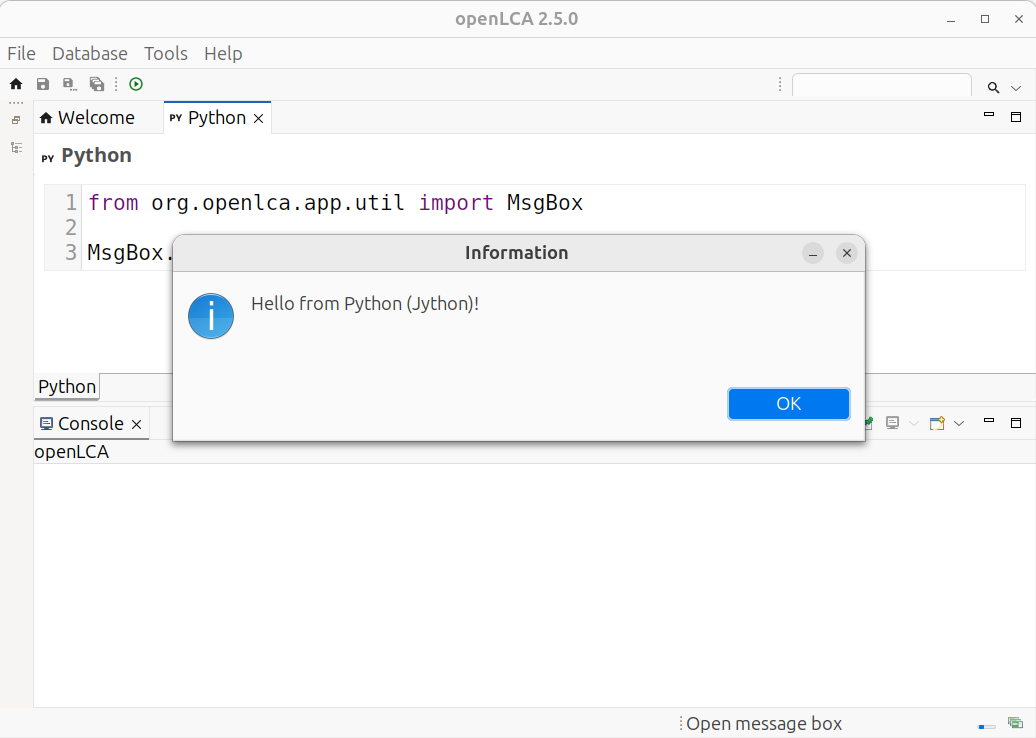
Available classes and imports
This page lists what your scripts can use: the openLCA classes available without any import, how to explore them, and the additional things you can import.
Classes available without an import
openLCA makes much of its own API available automatically — you can use these directly, no import
needed:
- Core data model —
Flow,FlowProperty,Unit,UnitGroup,Process,Exchange,ProductSystem,ImpactMethod,ImpactCategory,ImpactFactor,Parameter,Location,Category,Currency,NwSet,NwFactor,Result,AnalysisGroup,Version,RootEntity - Enumerations —
FlowType,FlowPropertyType,ProcessType,AllocationMethod,Direction,ParameterScope,ModelType - Parameter redefinitions —
ParameterRedef,ParameterRedefSet - Calculation & results —
CalculationSetup,SystemCalculator,LcaResult,TechFlow,TechFlowValue,EnviFlow,EnviFlowValue,ImpactValue,UpstreamTree,UpstreamNode,Sankey,AnalysisGroupResult,TechIndex,EnviIndex,NwSetTable - Building product systems —
ProductSystemBuilder,LinkingConfig,ProviderLinking - Descriptors —
Descriptor,RootDescriptor,FlowDescriptor,LocationDescriptor,ImpactDescriptor - Database access —
ProcessDao,FlowDao,ProductSystemDao,CategoryDao,NativeSql - Input/output —
Excel - openLCA application —
App,Navigator,Editors,ResultEditor,Workspace
How to explore a class
The lists above give the names. To see what a class can actually do — its fields and methods — use either reference:
- API documentation (Javadoc) for the version this manual targets: olca-core 2.6.2 API — every class with its methods, and easier to read than the source.
- Source code on GitHub: the data model lives in the
olca-modules repository;
open a file such as
Flow.javato read its fields and methods.
Importing other Java classes
Any Java class on openLCA's classpath can be imported with from <package> import <Class>. This
includes:
- the Java standard library (
java.*,javax.*), e.g.from java.io import FileOutputStream; - any openLCA class by its full package, e.g.
from org.openlca.core.model import ProviderType; - libraries bundled with openLCA, such as Apache POI for Excel (
org.apache.poi.ss.usermodel), the Eclipse SWT widgets (org.eclipse.swt.*), and the SLF4J logger.
The Python 2.7 standard library
Jython ships with the Python 2.7 standard library, so the common pure-Python modules work out of the box:
import os, csv, json, datetime, math, re
A few standard-library modules that rely on CPython internals are not supported by Jython.
Your own Python modules
You can add your own Jython-compatible .py modules and import them. See
Create modules for where to put them.
What you cannot import
- Packages from PyPI are not installed — there is no
pipin the openLCA Python editor, so third-party packages are not available unless you add pure-Python modules yourself (see above). - Libraries with C extensions do not work at all — because Jython runs on the JVM, it cannot load
CPython C extensions. This rules out the scientific stack: NumPy, Pandas, SciPy and anything that
depends on them.
pandascannot run in Jython.
If you need NumPy, Pandas or similar, run your analysis in regular (C)Python and connect to openLCA through the openLCA IPC Python API instead.
Create modules
The Jython standard library is extracted to the python folder of the openLCA workspace which is by
default located in your user directory ~/openLCA-data-1.4/python. This is also the location in
which you can put your own Jython 2.7 compatible modules. For example, when you create a file
tutorial.py with the following function in this folder:
# ~/openLCA-data-1.4/python/tutorial.py
def the_answer():
    return 42
You can then load it in the openLCA script editor:
import tutorial
import org.openlca.app.util.MsgBox as MsgBox

MsgBox.info("The answer is %s!" % tutorial.the_answer())
Meta classes
RootEntity
The RootEntity is the base class for all entities (flows, processes, units, unit groups, ...). A
RefEntity is an entity that can be referenced by a unique ID, the reference ID or short refId.
class RootEntity:
    name: str
    refId: str
    description: str
    ...
Descriptors
Descriptors are lightweight models containing only descriptive information of a corresponding entity. The intention of descriptors is to get this information fast from the database without loading the complete model. Checkout the Interacting with the database chapter for more information.
class Descriptor: # or RootDescriptor
    name: str
    refId: str
    version: long
    lastChange: long
    library: str  # contains the library identifier
    tags: str
    type: ModelType
    ...
FlowDescriptor
The FlowDescriptor class extends the RootDescriptor class and adds the flow type, location as
well as the reference flow property ID.
class FlowDescriptor:
    name: str
    refId: str
    version: long
    lastChange: long
    library: str  # contains the library identifier
    tags: str
    type: ModelType
    flowType: FlowType
    location: long
    refFlowPropertyId: long
    ...
LocationDescriptor
The LocationDescriptor class extends the RootDescriptor class and adds the location code.
class LocationDescriptor:
    name: str
    refId: str
    version: long
    lastChange: long
    library: str  # contains the library identifier
    code: str
ImpactDescriptor
The ImpactDescriptor class extends the RootDescriptor class and adds the reference unit and the
direction.
class ImpactDescriptor:
    name: str
    refId: str
    version: long
    lastChange: long
    library: str  # contains the library identifier
    referenceUnit: str
    direction: Direction
To go further
Java source code
The olca-modules repository
You can find the detail of every data type of openLCA in the source code of the application. The repository is open source and you can browse the code yourself. The repository is available at github.com/GreenDelta/olca-modules.
The module containing the data model of openLCA is called olca-core. You can find the folder with
all the classes in
model.
Example
For example, if you wonder how to add normalization and weighting set to an impact method, you can find how to create a normalization and weighting set and add it.
- find the
ImpactMethodclass and check how to add a normalization and weighting set. In that case, you will use theImpactMethod.add(nwSet) # nwSet: NwSetmethod. - find the
NwSetclass and check how to build it withNwSet.of(name) # name: strmethod. - realize that you need to add
factorto this newNwSetinstance with theNwSet.add(factor) # factor: NwFactormethod. - check out the
NwFactorclass and find how to create it with theNwFactor.of(impact, normalisationFactor, weightingFactor) # impact: ImpactCategory, normalisationFactor: float, weightingFactor: float
You can now create and add a normalization and weighting set to an impact method with the following code:
nwSet = NwSet.of("My new normalization and weighting set")
nwSet.add(NwFactor.of(category_one, 4.2, 0.042))
nwSet.add(NwFactor.of(category_two, 2.4, 0.024))

method.add(nwSet)
Java first, then Jython
One helpful approach when working with Jython is to first write your code in Java and then translate it to Python syntax. This method can be very effective if you already have some experience with Java, as it allows you to reuse your knowledge of Java classes, method calls, and structure. You can use any Java IDE (like Eclipse or IntelliJ) to write your Java code first, which often makes debugging easier. Once your Java version looks good, you can convert it step by step into Python code that runs on the Jython interpreter.
Examples
Display a diagram with HTML
NOTE: This script must be run in an open BAFU database — a free, populated database available on Nexus. See Set up a database.
The following example shows how to display data in a diagram using HTML. In the example, all output
amounts of Emission to air/low population density/Zinc II and
Emission to air/low population density/Cadmium II
are collected from a database, transformed with f(x) = log10(x * 1e15) to make a nice
distribution, and shown in a histogram using the
Google Chart API. An HTML
page is generated that is loaded in a SWT Browser in a separate window.
import json
import math

from org.eclipse.swt import SWT
from org.eclipse.swt.browser import Browser
from org.eclipse.swt.layout import FillLayout
from org.eclipse.swt.widgets import Display, Shell


def get_flow(name, category):  # type: (str, Category) -> Flow
    """
    Get the flow `category / name` from the database.
    """
    flows = FlowDao(db).getForName(name)

    for flow in flows:
        if flow.category == category:
            return flow

    raise Exception("Flow not found: %s" % name)


def get_results():  # type: () -> List[List[float or str]]
    """
    Get the values for the flow from the process inputs and outputs and
    transform them: f(x) = log10(x * 1e15).
    """
    results = []

    category = CategoryDao.sync(
        db, ModelType.FLOW, "Elementary flows", "Emission to air", "low population density"
    )

    zinc = get_flow("Zinc II", category)
    results.append(collect_amounts(zinc))

    cadmium = get_flow("Cadmium II", category)
    results.append(collect_amounts(cadmium))

    return [list(row) for row in zip(*results)]


def collect_amounts(flow):  # type: (Flow) -> List[float or str]
    results = [flow.name]

    def collect_results(record):
        results.append(math.log10(record.getDouble(1) * 1e15))
        return True

    print("Collecting results for %s" % flow.name)
    query = (
        "SELECT resulting_amount_value FROM tbl_exchanges WHERE f_flow = %i AND is_input = 0"
        % flow.id
    )
    NativeSql.on(db).query(query, collect_results)

    print("%d results collected" % (len(results) - 1))

    return results


def make_html(results):  # type: (List[List[float or str]]) -> str
    """Generate the HTML page for the data."""

    html = """<html>
    <head>
        <script type="text/javascript" src="https://www.gstatic.com/charts/loader.js"></script>
        <script type="text/javascript">
        google.charts.load("current", {packages:["corechart"]});
        google.charts.setOnLoadCallback(drawChart);
        function drawChart() {
            var data = google.visualization.arrayToDataTable(%s);

            var options = {
                title: 'Metal Emission Levels',
                legend: { position: 'bottom' },
                hAxis: {
                    title: 'log(amount × 1e15)',
                    ticks: [%s]
                },
                vAxis: {
                    title: 'Number of exchanges'
                }
            };

            var chart = new google.visualization.Histogram(
                document.getElementById('chart_div')
            );
            chart.draw(data, options);
        }
        </script>
    </head>
    <body>
        <div id="chart_div" style="width: 900px; height: 500px;"></div>
    </body>
    </html>
    """ % (
        json.dumps(results),
        ", ".join(str(x) for x in range(-3, 16)),
    )
    return html


def main():
    """
    Create the results, HTML, and window with the Browser and set the HTML
    content of the Browser.
    """
    results = get_results()
    html = make_html(results)

    shell = Shell(Display.getDefault())
    shell.setText("Metal Emissions")
    shell.setLayout(FillLayout())
    browser = Browser(shell, SWT.NONE)
    browser.setText(html)

    shell.open()


App.runInUI("Visualizing Metal Emission Levels", main)
To see the result, copy and paste the code above in the openLCA Python console in an opened BAFU database.
The result looks like this:
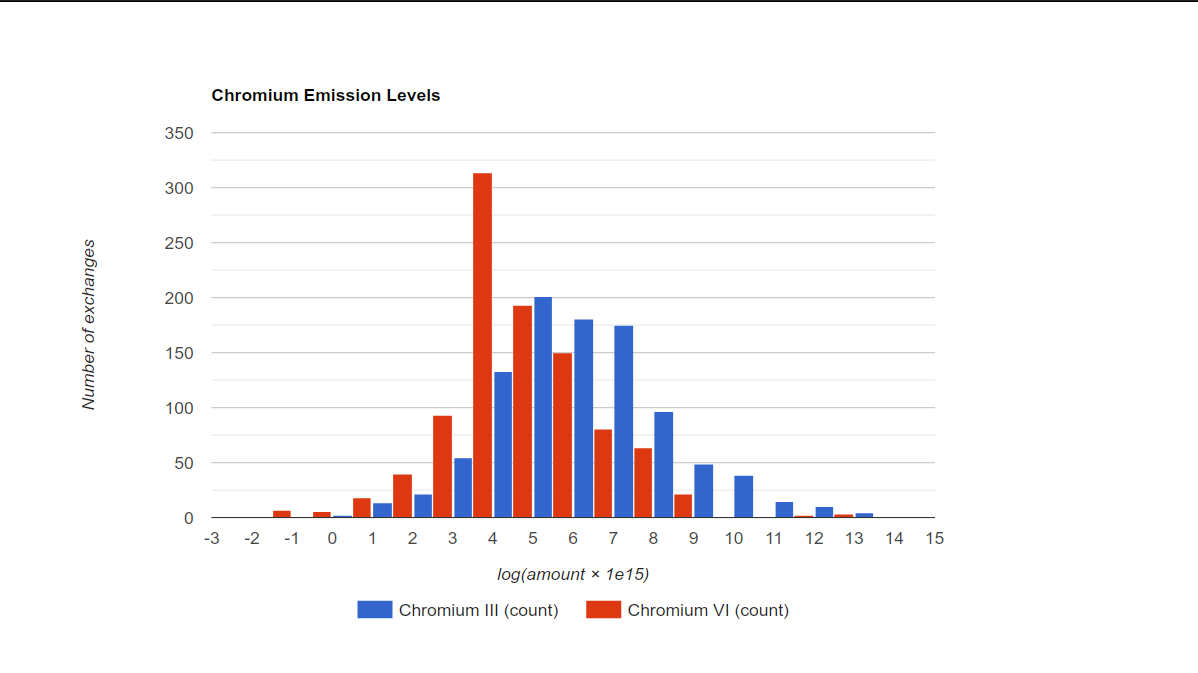
Excel automation
NOTE: This script must be run in an open BAFU database — a free, populated database available on Nexus. See Set up a database.
This example shows how a tedious task can be automated using a spreadsheet and Jython.
Our use case is the following:
- We have a spreadsheet with a list of processes and their UUIDs.
- We want to create a product system for each process and run impact calculations on it.
- We want to store the results in a new sheet in the same spreadsheet.
An example spreadsheet can be downloaded here. It provides a list of processes from the BAFU database.
Checkout the Excel chapter for more details about how to open the spreadsheet.
import string

from java.io import FileInputStream, FileOutputStream
from org.apache.poi.ss.usermodel import WorkbookFactory

# Do not forget to edit this path to point to your XLSX file!
PATH = "path/to/excel_automation.xlsx"
IMPACT_METHOD_ID = "IMPACT_METHOD_ID"

# loads the workbook from the file, we are using a FileInputStream to be able to later write to it
input_stream = FileInputStream(PATH)
workbook = WorkbookFactory.create(input_stream)

# get the Processes sheet
sheet = workbook.getSheet("Processes")


def get_cell(sheet, column, row):  # type: (XSSFSheet, str, int) -> XSSFCell
    """This function is an helper to use the cell names (A1, B1, C1, etc.) instead of their index."""
    column_label = string.ascii_uppercase.index(column)
    return sheet.getRow(row).getCell(column_label)


def get_string_cell(sheet, column, row):  # type: (XSSFSheet, str, int) -> str
    """Retrieve the string value of a cell"""
    return get_cell(sheet, column, row).getStringCellValue()


def get_numeric_cell(sheet, column, row):  # type: (XSSFSheet, str, int) -> float
    """Retrieve the numeric value of a cell"""
    return get_cell(sheet, column, row).getNumericCellValue()


def get_process_info(sheet):  # sheet: XSSFSheet -> Generator[dict[str, str or float]]:
    """Returns a generator that iterates over the rows of the sheet and returns a dictionary
    with the process name, amount and UUID."""
    for i in range(1, sheet.getLastRowNum() + 1):
        name = get_string_cell(sheet, "A", i)
        amount = get_numeric_cell(sheet, "B", i)
        uuid = get_string_cell(sheet, "C", i)
        yield {"name": name, "amount": amount, "uuid": uuid}


def product_system_from_process(uuid):  # type: (str) -> ProductSystem
    """Create a product system from a process UUID"""
    process = db.get(Process, uuid)
    if not isinstance(process, Process):
        raise Exception("Process not found: " + uuid)

    config = (
        LinkingConfig()
        .providerLinking(ProviderLinking.PREFER_DEFAULTS)
        .preferredType(LinkingConfig.PreferredType.UNIT_PROCESS)
    )

    return ProductSystemBuilder(db, config).build(process)


def result_of_system(system, amount):  # type: (ProductSystem, float) -> Result
    """Run an impact calculation on a product system"""
    method = db.get(ImpactMethod, IMPACT_METHOD_ID)
    setup = CalculationSetup.of(system).withAmount(amount).withImpactMethod(method)

    return SystemCalculator(db).calculate(setup)


def impacts_of(
    process,
):  # type: (dict[str, str or float]) -> Generator[dict[str, float or str]]
    """Returns a generator that iterates over the impacts of a process and returns a dictionary"""
    system = product_system_from_process(process["uuid"])
    result = result_of_system(system, process["amount"])
    for impact in result.getTotalImpacts():
        yield {
            "name": impact.impact().name,
            "value": impact.value(),
            "unit": impact.impact().referenceUnit,
        }


def run_calculations(sheet):
    for process in get_process_info(sheet):
        print("Running impact calculation for %s..." % process["name"])
        for impact in impacts_of(process):
            print(
                "The total impact on %s is %.4f %s."
                % (impact["name"], impact["value"], impact["unit"])
            )


def get_or_create_sheet(workbook, name):  # type: (XSSFWorkbook, str) -> XSSFSheet
    sheet = workbook.getSheet(name)
    if sheet is None:
        return workbook.createSheet(name)
    else:
        return sheet


def write_impacts_to_sheet(
    sheet, impacts
):  # type: (XSSFSheet, dict[str, float or str]) -> None
    row = sheet.createRow(0)
    row.createCell(0).setCellValue("Name")
    row.createCell(1).setCellValue("Value")
    row.createCell(2).setCellValue("Unit")

    for i, impact in enumerate(impacts):
        row = sheet.createRow(i + 1)
        row.createCell(0).setCellValue(impact["name"])
        row.createCell(1).setCellValue(impact["value"])
        row.createCell(2).setCellValue(impact["unit"])

    for i in range(3):
        sheet.autoSizeColumn(i)


for process in get_process_info(sheet):
    sheet = get_or_create_sheet(workbook, process["name"])
    print("Running impact calculation for %s..." % process["name"])
    impacts = list(impacts_of(process))
    write_impacts_to_sheet(sheet, impacts)

# write the workbook content to the file
output_stream = FileOutputStream(PATH)
workbook.write(output_stream)

# close the input and output streams to ensure data is properly saved
input_stream.close()
output_stream.close()

# close the workbook to free resources
workbook.close()

# refresh the navigator — only necessary if you change this script to persist the
# product systems to the database (e.g. via ProductSystemBuilder.update(db, system));
# as written, nothing is saved, so there is nothing new to show
App.runInUI("Refresh navigator", lambda: Navigator.refresh())

print("Done")
Batch calculate to Excel
This recipe calculates every product system in the database under one impact method and writes the total impact per category to an Excel file — one row per product system, one column per impact category.
from java.io import FileOutputStream
from org.apache.poi.ss.usermodel import WorkbookFactory

# where the results will be written
PATH = "/path/to/results.xlsx"

# the impact method used for every calculation
method = db.getForName(ImpactMethod, "AWARE")
categories = list(method.impactCategories)

# create a workbook and a sheet
workbook = WorkbookFactory.create(True)
sheet = workbook.createSheet("Results")

# header row: one column per impact category
header = sheet.createRow(0)
header.createCell(0).setCellValue("Product system")
for col, category in enumerate(categories):
    header.createCell(col + 1).setCellValue(
        "%s [%s]" % (category.name, category.referenceUnit)
    )

# one row per product system
for i, system in enumerate(ProductSystemDao(db).getAll()):
    setup = CalculationSetup.of(system).withImpactMethod(method)
    result = SystemCalculator(db).calculate(setup)

    row = sheet.createRow(i + 1)
    row.createCell(0).setCellValue(system.name)
    for col, category in enumerate(categories):
        value = result.getTotalImpactValueOf(Descriptor.of(category))
        row.createCell(col + 1).setCellValue(value)

    # free the result memory before the next calculation
    result.dispose()

# write the workbook to the file and close everything
output_stream = FileOutputStream(PATH)
workbook.write(output_stream)
output_stream.close()
workbook.close()

print("Wrote results for %d product systems to %s" % (sheet.getLastRowNum(), PATH))
About this manual
⚠️ NOTE: This documentation was written for and tested with openLCA 2.6.2. While many examples and techniques still work in newer versions, some functionality may have changed.
We encourage you to:
-
Open an issue if you encounter something that does not work or is unclear.
-
Contribute improvements, fixes, or new examples. If you have built a useful script or utility with Jython in openLCA, others would certainly benefit from it.
-
Share feedback, questions, or suggestions in the openLCA forum.
This manual is community-driven. Your contributions—be it fixing outdated code, adding usage tips, or documenting common pitfalls—will make this guide more helpful for everyone.
Feel free to fork the repository, suggest edits, or just open an issue describing what you'd like to add or improve.
Happy scripting! 🐍